Ради вашего удобства наш сайт использует cookies! Узнать больше! Мы используем cookies

USE Set Apparel Draw Order

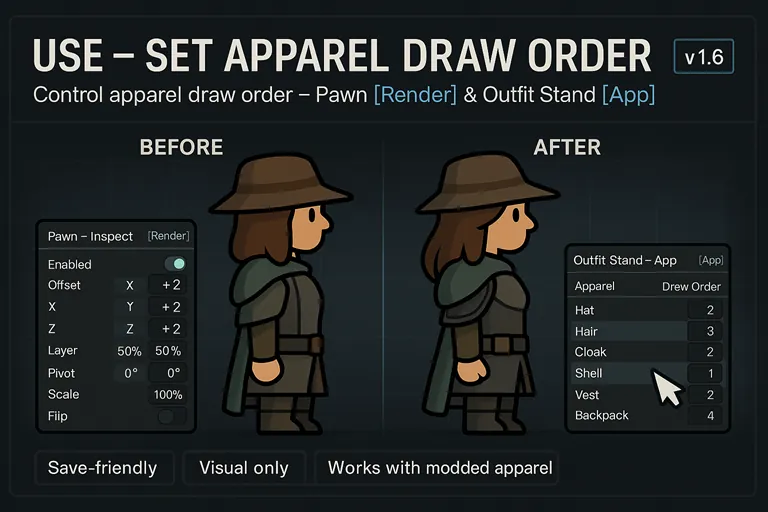
USE – Set Apparel Draw Order (v1.6) [i]Fine-tune how apparel is drawn and tweak per-node visuals, so your pawns look exactly the way you want.[/i] What this mod does [list] []Lets you reorder apparel drawing for displays and stands, fixing clipping and layering issues. []Adds a powerful per-pawn [b]Render[/b] tab to adjust the pawn’s render tree (offsets, scale, layer, flip, etc.). []Non-destructive: visuals only—no stat changes. []Save-friendly and light on performance. [/list] Where to use it (v1.6 UI) [b]In v1.6, the controls live in two different places:[/b] [list] [][b]Pawn[/b] → Inspect pane → [b][Render][/b] tab (render-tree editing) [][b]Outfit Stand[/b] → Inspect pane → [b][App][/b] tab (drag-to-reorder apparel) [/list] Pawn: Render-tree editing ([Render] tab) Open any pawn’s Inspect pane and click [b][Render][/b]. You’ll see a [i]Render Tree[/i] view and detailed controls. [list] [][b]Select a node[/b] in the Render Tree to edit it. []Use the right-side controls: [list] [][b]Enabled[/b] — toggle your override on/off for the selected node. [][b]Offset[/b] — adjust [b]X / Y / Z[/b] positional offsets. [][b]Layer[/b] — add a layer offset (draw later = appears on top). [][b]Pivot[/b] — set pivot [b]X% / Y%[/b]. [][b]Angle[/b] — rotate the node (°). [][b]Scale[/b] — scale the node (%). [][b]Flip[/b] — flip the node display. [][b]Alpha[/b] — change transparency for previewing. [][b]Show all nodes[/b] — reveal hidden nodes for inspection. [/list] []Actions: [list] [][b]Save Node[/b] — save overrides for the current node. [][b]Reset Node[/b] — revert the current node to defaults. [*] [b]Reset All[/b] — clear every override on this pawn. [/list] [/list] [b]Tips[/b] • Hold [b]Shift + Mouse Wheel[/b] for fine adjustments on sliders. • Press [b]Ctrl + R[/b] to restore slider ranges to their defaults. • “Value Range” shown on the tab reflects limits you can tune in Mod Settings. Outfit Stand: Apparel order ([App] tab) Interact with an Outfit Stand and open the [b][App][/b] tab. [list] [][b]Drag items[/b] up/down to change draw priority. Items higher in the list are drawn later (on top). []Click [b]Auto Order[/b] to auto-sort if you want a quick baseline. [*] Changes apply immediately; the stand’s graphics are recached on the fly. [/list] Advanced: numeric order on the Stand’s [Contents] On the Outfit Stand’s default [b][Contents][/b] tab, each apparel also shows a numeric [b]Draw Order[/b] field. Enter a value to nudge relative draw depth precisely (useful for tricky pieces). This works alongside the [App] tab’s drag-and-drop. Mod Settings Open [b]Mod Settings → USE Set Apparel Draw Order[/b]. [list] [][b]Functional on every pawn?[/b] — enable functionality beyond colonists. [][b]Disable head apparel when in bed[/b] — prevents headgear from rendering while lying in bed to reduce clipping. [][b]Enable Free mode[/b] — unlocks broader editing freedom in the Render tab. [][b]DrawOffsetDivider[/b] — scaling divider used when converting order/offset into final draw depth. [*] [b]Slider ranges[/b] — customize allowed min/max for Offset (X/Y/Z), Layer, Angle, and Scale. ([i]These define the “Value Range” shown in the [Render] tab.[/i]) [/list] Compatibility [list] []Works with vanilla and most modded apparel. Mods that completely replace render logic or use custom shaders may ignore some overrides. []Safe to add to existing saves. Removing the mod reverts visuals to the game’s default order. [/list] FAQ [b]Q.[/b] Where are the controls in v1.6? [b]A.[/b] Use [b][Render][/b] on pawns to tweak the render tree. Use the Outfit Stand’s [b][App][/b] (and optional [b][Contents][/b] → [b]Draw Order[/b]) to reorder apparel. [b]Q.[/b] Does this affect stats or armor coverage? [b]A.[/b] No—only draw order and visual transforms. [b]Q.[/b] My change didn’t show up immediately. [b]A.[/b] The stand/pawn usually refreshes instantly. If not, switch tabs or reselect the pawn/stand to force a quick recache. Changelog [b]v1.6[/b] [list] []Added a new pawn [b][Render][/b] tab for full render-tree editing. []Moved apparel ordering to the Outfit Stand’s [b][App][/b] tab; added precise [b]Draw Order[/b] input on the Stand’s [b][Contents][/b] tab. [*] Range customization and quality-of-life tweaks (fine-tune shortcuts, reset options). [/list] (Description and Preview Image Generated by AI)