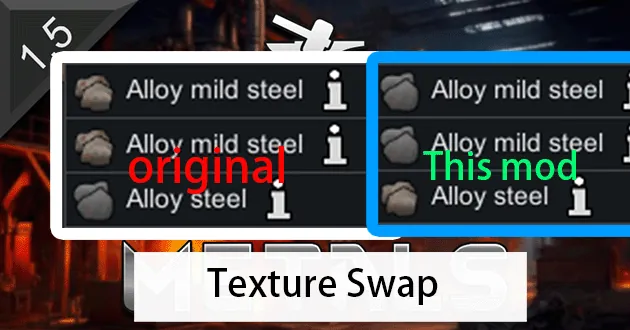
Swapped the textures of steel and mild steel, that's all this mod does.
-----------------------------------------------------------------------------------------------------------------
Expanded Materials - Metals /anther:“They're not reversed. It's intended that mild steel has the vanilla steel texture while steel has a new one.”
-----------------------------------------------------------------------------------------------------------------
If you have installed Tang Maru's texture mod, specifically [TW1.5]堂丸贴图重置~原材料 Tang's~Retexture~Resource, and you notice that the steel texture hasn't changed, you need to copy the three images (Steel_a.png, Steel_b.png, Steel_c.png) from the path \3050448166\Textures\Things\Item\Resource\Steel in the Tang Maru mod to this mod's Textures\Things\Item\Resource\EM_Steel folder. Simply place them in the EM_Steel folder so that it contains a total of six images.
However, there's a bug with this method: the original texture will still coexist with Tang Maru's texture (when the steel is generated at the start of a scenario), but once the steel is stacked together, it will display Tang Maru's texture. I haven't tested the situation during manufacturing, but the good news is that in the build planning section, when you click to create something, the required items will always show 堂丸 steel texture.
There are no issues using other texture mods now.
It also fixed the issue where the steel texture remained unchanged when using texture mods.