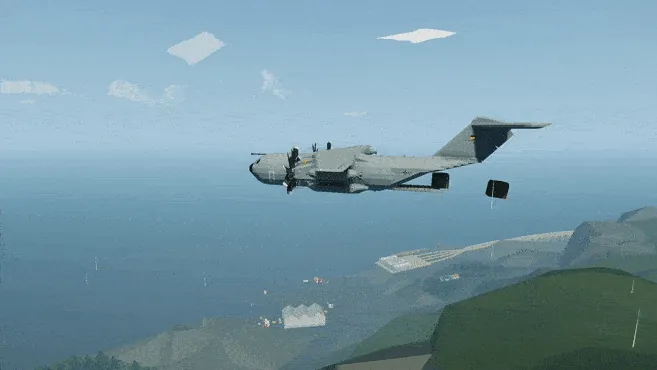
This is a Generic Air-Drop Crate for my Airbus A400M Cargo Plane
If you prefer, you can just download this version of the Plane with the Air-Drop Crates already loaded in the Cargo Bay.
Instructions:
Load it in the Cargo Bay (you can fit up to 12 of them, plus 2 more on the Ramp), either by using the Selection Tool in the workbench (Selection Tool>Load>Air-Drop Crate>Paste), or by loading it from the Ramp like any other vehicle after you spawn the Plane.
Before takeoff, don’t forget to lock the Air-Drop Crates by pressing the “Toggle Air-Drop Connectors” Push Button once as soon as you enter the Plane (it auto-activates for 20 sec upon spawning, to prevent cargo from moving around freely, then deactivates).
It can be filled with generic cargo (or people, why not?) from the front door.
The Parachute automatically opens when the crate detects it is falling down, and is activated by the Key in the front (by default it's already ON).
Credits:
Based on the SSI Air-Drop Crate

Major Update #1 (v 1.1):
Now all Cargo Locking Systems (Cargo Tracks, ISO Zones) and Ramps on my Airbus A400M Cargo Plane can be Radio Controlled!
This means you can be ON the Vehicles (or Cargo) that you are air-dropping, and let the Plane fly away while you drive your air-dropped Vehicle.
Moreover, if you’re using the Air-Drop Crates v2.0 (or higher), you can now finally air-drop yourself!
To make a Vehicle compatible with this system, you just need to add a Radio, an Instrument Panel with 2 buttons, and this Microcontroller to it.
Minor Update (v 1.2):
Added an Emergency Beacon to the Air-Drop Crates, activated with a key on the Crate itself.
This way you can find your Crates more easily, in case you forgot where you air-dropped them ;)
Major Update #2 (v 2.0):
Completely redesigned Air-Drop System.
New Electric Connectors have been added to the Cargo Bay of the Airbus A400M to store up to 14 Small Air-Drop Crates v2.0 or 7 Air-Drop Crates v3.0
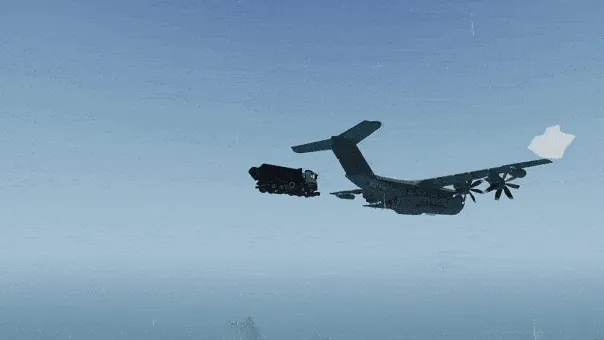
These Electric Connectors allow to do Staggered Air-Drops (each Crate/Vehicle is slightly delayed from the previous one, see GIF), by adjusting the “Delay” Property Slider of the Air-Drop Microcontroller on each Crate (0.5 sec delay works well).
To start the Staggered Air-Drop just press the “Toggle Air-Drop Connectors” Push Button (in Cockpit, Loadmaster’s Station and Ramps Panel).
Important:
To connect the Crates/Carts to the new Air-Drop Connectors, remember to press the “Toggle Air-Drop Connectors” Push Button once as soon as you enter the Plane (it auto-activates for 20 sec upon spawning, then deactivates).
Moreover, all the ISO Electric Connectors can now be used to do Staggered Air-Drops as well (use the same Push Button to initiate the Staggered Air-Drop).
This means any Cargo you attach to these Connectors can be air-dropped with this new System: you just need to add this Microcontroller to control the Electric Connectors on your Cargo
Having the Air-Drop Crates secured with Electric Connectors in the Cargo Bay means you no longer have to stay below 180knots when flying with the Crates in the Plane (which was due to the limited braking power of the Cargo Grippers in the old system).
All the Carts (Vehicle Cart v2.0, Wide Vehicle Cart v2.0, Cart for RHIB v2.0, Cargo Platform v2.0) have been updated to integrate the new Air-Drop System, so they can be used to perform Mixed Air-Drops (both Crates and Vehicles at the same time, see GIF).
Enjoy! Please consider leaving a Rating and a Comment. Feel free to write any Suggestions or Issues you might have in the comments below.