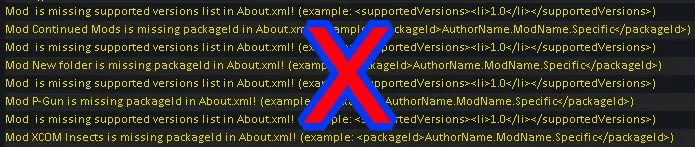
This mod does all the things you've ever wanted it to do. Also, (and only) it will eliminate all those pesky yellow errors you get from mods that have not updated their version to 1.2.
Instructions:
- Locate the mod you are looking for in the Discussion below to see if it's included.
- Subscribe to this mod.
- Locate the Steam Workshop folder here (Drive where your games are loaded):\SteamLibrary\steamapps\workshop\content\294100

- Search for 2314323141
- Open and locate the folder for the mod you are looking for.
- Copy About.xml file.

- Find the mod you are looking for in Steam Workshop
- Navigate to the folder using the same path above with the mod ID found here

- Open folder and navigate to About folder
- Replace the About.xml with the new one from this mod.
- Reload Rimworld
- Bunnies and puppies will explode into rainbows and doubloons.
NOTES:
- If/when the mod updates the updated version will replace this file automatically unless you've moved the mod to a local location.
- If there are mods that patch the mod you are using the patches might break. I won't fix those. Speak with the mod authors who made the patches.
- This will break Mod Manager's sorting system. It won't cause any issues. It just won't tell you if a mod is out of order.
- There is a possibility the mod will still be incompatible with 1.2. If you notice issues please let me know. I will remove it. See discussion below for removed mods.
- See Discussion below for requesting other mods.
- Only for 1.1 mods. 1.0 or older need proper updates.
- I have included a template in the [001] Template folder you need to replace these two values and follow the steps above if you want to update mods on your own.

 [discord.gg]
Mi Ko-fi page if you feel like contributing: https://ko-fi.com/velcroboy