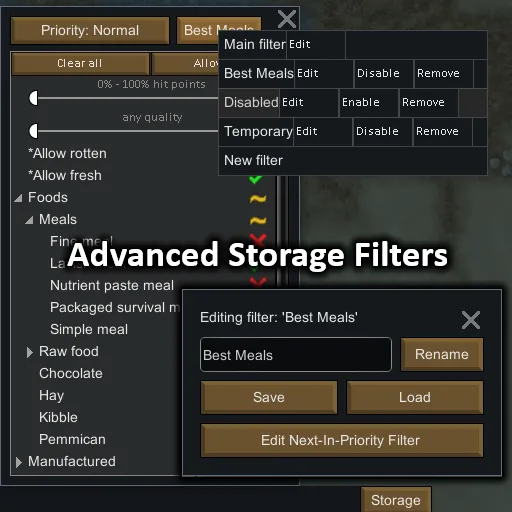
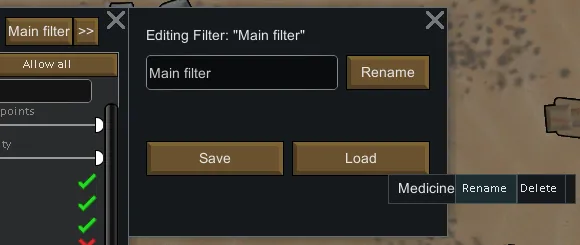
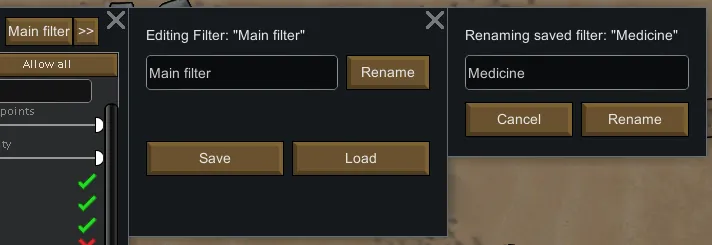
Adds the ability to add extra advanced and configurable filters to storage areas. It also allows filters to be saved and loaded between multiple saves.
Extra Filters
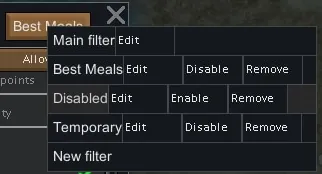
You can add extra filters to containers.
You can use these to, say, have one filter handling weapons, one handling clothing, etc. etc.
You could also use these to more adequately fine-tune the special filters (like "Allow rotten" and the likes), which can especially help should you use mods that add a lot of those.
These filters (and the original filter) are essentially all combined when determining if an item is allowed in a container.
These extra filters also come with multiple unique features/settings of their own, many excluded from the original "Main" filter for full save compatibility, explained below:
Toggleable Filters
All of those extra filters can be very easily toggled between enabled and disabled with the click of a button.
Prioritizing Filters (similar to Stockpile Ranking)
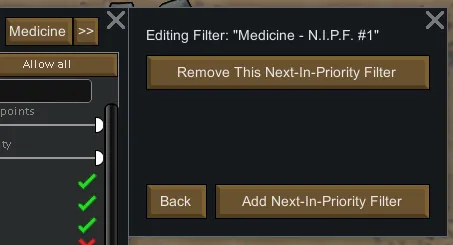
All extra filters can have "Next-In-Priority Filters" attached, which allow the prioritization of certain items being stocked in containers before others, with items being moved out of respective containers when necessary to make sure of this.
Say you have prisoners in a room with a storage container set to haul simple meals. What happens when you run out of simple meals, your prisoners starve? Well not anymore, because with these prioritizing filters you can have it stock fine meals in the case that the simple meals run out, and when the fine meals run out have it stock lavish meals, etc. etc.
These "Next-In-Priority Filters" can be added to all filters apart from the original "Main" filter (for save compatibility of course).
See here[imgur.com] for an idea of how these are set up.
NOTE: The UI has changed a bit since these images were taken.
The highest priority filter is the base filter (the one you can rename, save, load, etc.), and the priority descends with each next-in-priority filter (of which there can be an effectively unlimited amount). Containers will be stocked with the items allowed in the higher priority filters FIRST.
Limiting Filters (similar to Stockpile Stack Limit)
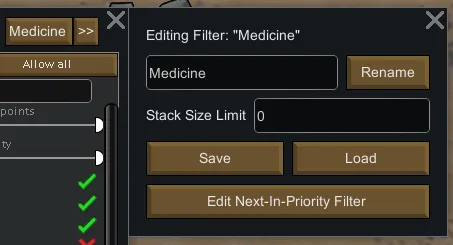
All extra filters can have stack size limits attached.
A stack count limit is also in the works, however that feature is proving to be much harder to implement.
These stack limits can be attached only to the base extra filters (next-in-priority filters will use the stack limits set by the base extra filter), meaning they cannot be set on the original "Main" filter (for save compatibility of course).
NOTE: Stack limits can be (and are by default) disabled by setting them to a value of 0.
ALSO NOTE: These limit functions are a little buggy at the moment due to game updates, however they should work mostly correctly.
Saveable Filters
All extra filters (and even the original "Main" filter) can be saved and loaded between multiple saves.
Copying and Pasting
Copying and pasting storage settings between containers will also take into account all of the extra filters and their respective settings.
Save Compatibility
The original filter of containers aren't changed in any way, making the mod completely safe to add to or remove from saves.
Language Compatibility
- English
- Spanish courtesy of lmgginspace
If you translate the mod into other languages and would like to see those translations in the actual mod, feel free to post it in the comments below or send it to me on discord @ pointfeev#4538!
Mod Compatibility
- Common Sense: Very unlikely to cause any issues, but it's been tested just in case.
- Pick Up And Haul: Tested and works 98% as intended; seems to cause very minor conflict with the stack limits, however that conflict is usually only by plus or minus a few items and will usually clear itself up very quickly.
- While You're Up / PUAH+: Same as above? Might even be the actual culprit for above, but I haven't tested it alone.
- Material Filter: Button display is fully patched to allow editing of material filters for this mod's extra filters, as well as to ensure both mods' buttons are fully visible and windows do not overlap.
If you encounter a bug or a potential compatibility issue, please leave a comment and I'll try my best to fix it!
GitHub: StorageFilters[github.com]