RImtalk Expand : News, Expert and Colony Chronicle
Give RimTalk eyes and a brain — so the AI actually knows what's happening in your colony
The Problem
You've got RimTalk installed. Colonists can finally have conversations. But have you noticed — sometimes the AI just... doesn't know what's going on? A colonist just died. You won the biggest raid of your playthrough. You just researched something massive. The AI has no idea.
Because RimTalk's AI is blind by default. It can't see your colony.
This mod gives it vision.
It doesn't handle talking — that's RimTalk's job. What this mod does is: continuously collect real-time intelligence from your colony and pipe it into RimTalk as structured data, so the AI actually has something to work with.
Requirements
- RimTalk (required — this mod is meaningless without it)
- Harmony (required)
- RimTalk Expand Memory (optional — multiple compatibility modes available)
Feature 1: The Expert Panel + Colony News
Six AI Experts. Your colony, monitored 24/7.
This is the intelligence-gathering engine of the mod. Six specialists, each covering their own domain:
Situational Awareness Boss
Aggregates everything into a comprehensive briefing at regular intervals. Acts as the hub of the entire expert network. Commands two sub-experts: resource assessment and combat readiness evaluation.
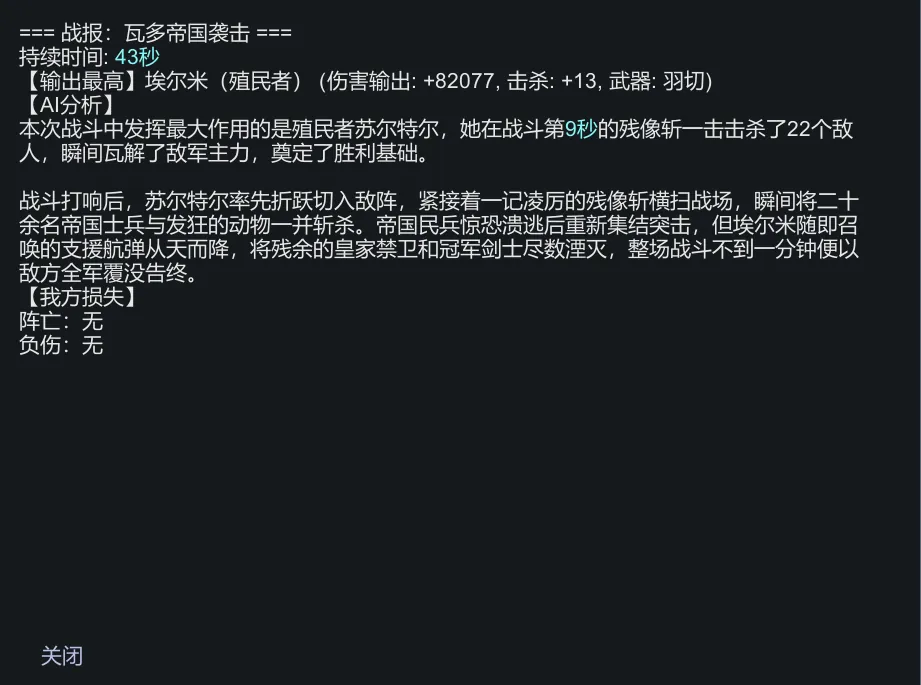
Combat Assessment Expert
Auto-generates an after-action report at the end of every fight: participants, casualties, weapons used, duration — all logged. Report style is configurable: Concise, Focused, or Detailed.
Research Expert
Fires off a report the moment any research project completes.
Personnel Expert
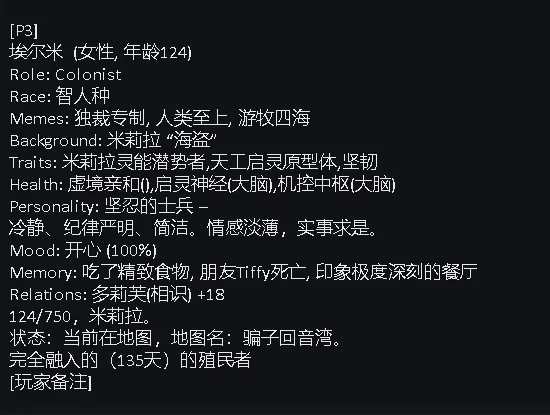
Tracks every join, death, departure, banishment, and capture in real time. Infers cause of death, detects mood chain reactions, and automatically profiles every colonist with a rating (A through D).
Diplomacy Expert
Notifies you the moment any faction relationship shifts.
Work Management Expert
Tracks how much time each colonist spends working and what they actually produce.
Every expert has its own settings panel. AI prompts are fully editable — change the report style, adjust trigger frequency, or rewrite the logic entirely.
The Colony News Ticker
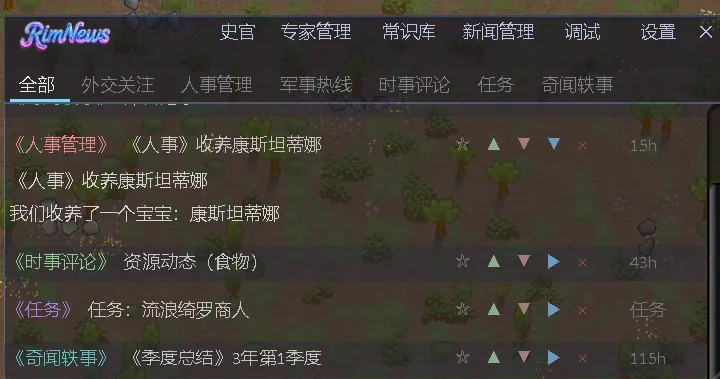
Intelligence isn't just piped to RimTalk — it also broadcasts in-game:
- A persistent news ticker in your UI, scrolling colony events in real time
- Seven channel categories: Personnel, Military, Situation, Research, Diplomacy, Missions, Misc
- Three-color sentiment tags: red (negative), green (positive), grey (neutral)
- Each news item has a TTL — it expires and disappears automatically, no clutter
- Priority weighting keeps important items visible longer
- Duplicate events from the same source/target are automatically merged
Custom intercept rules: Configure rules to trigger custom news items based on event defName or keyword conditions. You decide what gets reported and how.
Feature 2: Colony Chronicle
The data collected by the expert panel doesn't just broadcast in the moment — it gets turned into history.
- The AI writes a colony journal entry every in-game day, based on the day's intelligence
- A quarterly summary auto-generates every 15 days
- Journal entries are published to the news channel automatically
- A full Chronicle browser with tag filtering and keyword search
- Chronicle writing style is fully customizable via prompt editing
- Source data for chronicle generation is fully configurable
A few years in, crack open the Chronicle and you'll find a real history of your specific colony.
Feature 3: Common Knowledge Base + Colonist Memory
Knowledge Base — fill in what the AI can't know on its own
Some things the AI won't figure out by itself. The knowledge base lets you write them in manually.
- Categorized entries: Faction history, race background, xenotype lore, world-building rules, diplomatic stances, colonist profiles
- Tag substring matching: the AI automatically selects relevant entries to inject into context
- Visual editor with import/export support
- Colonist profiles filed by the Personnel Expert are auto-added to the knowledge base
Colonist Memory Layers
Each colonist carries two memory layers:
- Active layer: Ultra-short-term memory, keeps the 5 most recent key events
- Situational layer: Short-term memory, retains up to 20 recent contextual records
Memories age out and deduplicate automatically. When RimTalk generates content, it can reference these memory layers to understand what a specific colonist has recently been through.
Feature 4: RimTalk Data Injection
All the data collected above ultimately feeds into RimTalk. Here's what gets injected:
- pawn.colony_news variable: the colony's news stream from the past 24 hours
- pawn.cyberchronicle_knowledge variable: currently matched knowledge base entries
- Real-time event tracking prompt entries (combat, research, personnel, etc.)
When RimTalk's prompt templates reference these variables, the AI can draw on actual colony data when generating its output.
Compatibility
Without Expand Memory: Standalone mode. All features work independently.
With Expand Memory installed: Three cooperation modes (A/B/C), selectable in settings:
- Mode A: Fully independent — both mods run separately, no interference
- Mode B: Shared data channels — reduces redundant injection
- Mode C: Deep integration — data is aggregated before injection
The One-Line Pitch
RimTalk gives colonists a voice. This mod gives the AI something to say.
Feed your colony's real intelligence into RimTalk — who fought in that last raid, who just died and why, which faction just turned hostile, what the mood looks like right now. With this data flowing in, RimTalk's context stops being a blank slate.
Questions or suggestions? Leave a comment in the discussion section.