RimManyItems
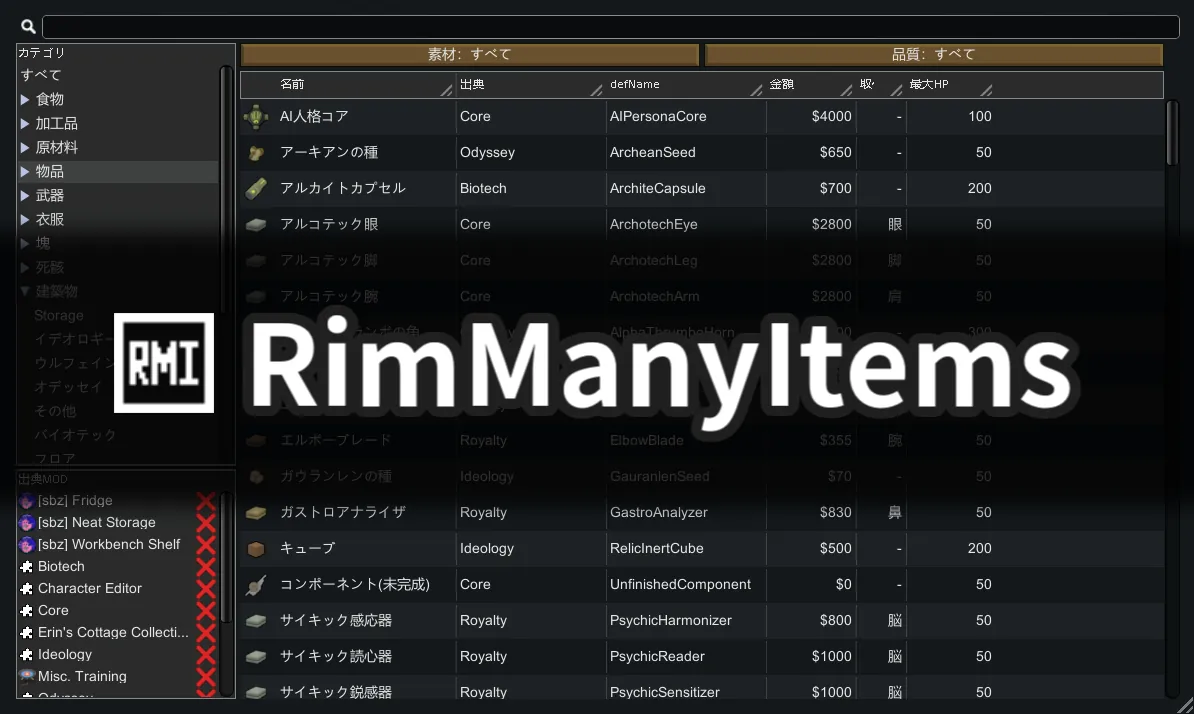
An in-game item browser tab. Browse, sort, and filter every item, building, and floor — including content from all loaded mods — in one place.
Requires: Harmony, RimWorld 1.6
Item Browser Tab
A new tab added to the bottom UI bar. Every ThingDef and TerrainDef in the current game, unified in a single scrollable list.
- Items, buildings, and floors in one place
- Category tree on the left — click any node to filter by type
- Icon and name always visible in frozen columns on the left
Dynamic Stat Columns
Hover over any stat in the item info panel and click the pin button to add it as a sortable column.
- Builtin columns: Range, Damage, Coverage, Apparel Layer, Created At (research unlock order)
- Stat columns: any StatDef — market value, beauty, flammability, work to build, and more
- Pin / unpin columns; move left / right to reorder
- Drag column dividers to resize; right-click a divider to reset to default width
Filters
- Name / defName — type to search
- Category — click the category tree
- Per-column filters — right-click a cell or column header:
- Range filter for numeric stats
- Substring filter for text columns
- Set filter for multi-value columns (apparel layer, material, quality, source mod, …)
Spoiler Protection (opt-in)
Toggle in Mod Settings (default: off). When enabled, only items, buildings, and floors you already know about are shown — everything else is hidden.
- Items and buildings — shown if you can craft them (research complete) or if they have ever appeared on one of your maps
- Floors — shown if research is complete or if you have walked over them on a map
- Encounter history is saved with your game and expands automatically as you explore
- Great for blind playthroughs or challenge runs where you don't want to see unresearched content
Other
- Source mod column — see at a glance which mod each item comes from
- defName column — handy for modders and modpack makers
- Localization: English, 日本語
Compatibility
- Reads stats dynamically via a Harmony patch on StatDrawEntry — works with every mod that adds stats or items.
- Adds no persistent game state; safe to add or remove from any save.
日本語
ゲーム内アイテムブラウザタブです。全アイテム・建築物・床材を1画面で一覧・ソート・フィルタできます。アイテム情報パネルの任意のStatにカーソルを当ててピンボタンを押すと列として追加可能。組み込み列(射程・ダメージ・カバレッジ・防具レイヤー・作成順)と任意のStat列に対応。数値範囲・部分一致・セットフィルタを搭載。ネタバレ配慮モード搭載:Modセッティングで有効にすると、まだ研究・製造できず、マップ上で一度も見かけたことのないアイテム・建築物・床材を非表示にします。HarmonyでStatを動的に読み取るため全Modに対応。セーブへの追加・削除ともに安全。
必要: Harmony / RimWorld 1.6
简体中文
游戏内物品浏览标签页。在同一界面中浏览、排序、筛选所有物品、建筑与地板(含全Mod内容)。将鼠标悬停在物品信息面板的任意属性上,点击固定按钮即可添加为可排序的列。支持内置列(射程、伤害、覆盖率、服装层级、创建顺序)及任意Stat列,提供数值范围、文本子串、集合三种筛选方式。内置剧透保护模式(可选):启用后,仅显示已解锁(研究完成)或在地图上见过的物品、建筑与地板,未知内容自动隐藏。通过Harmony动态读取属性值,兼容所有Mod。可安全添加或移除存档。
依赖: Harmony / RimWorld 1.6