SahchoB Recipe Creator
Create custom crafting recipes in-game — no restart required.
Features
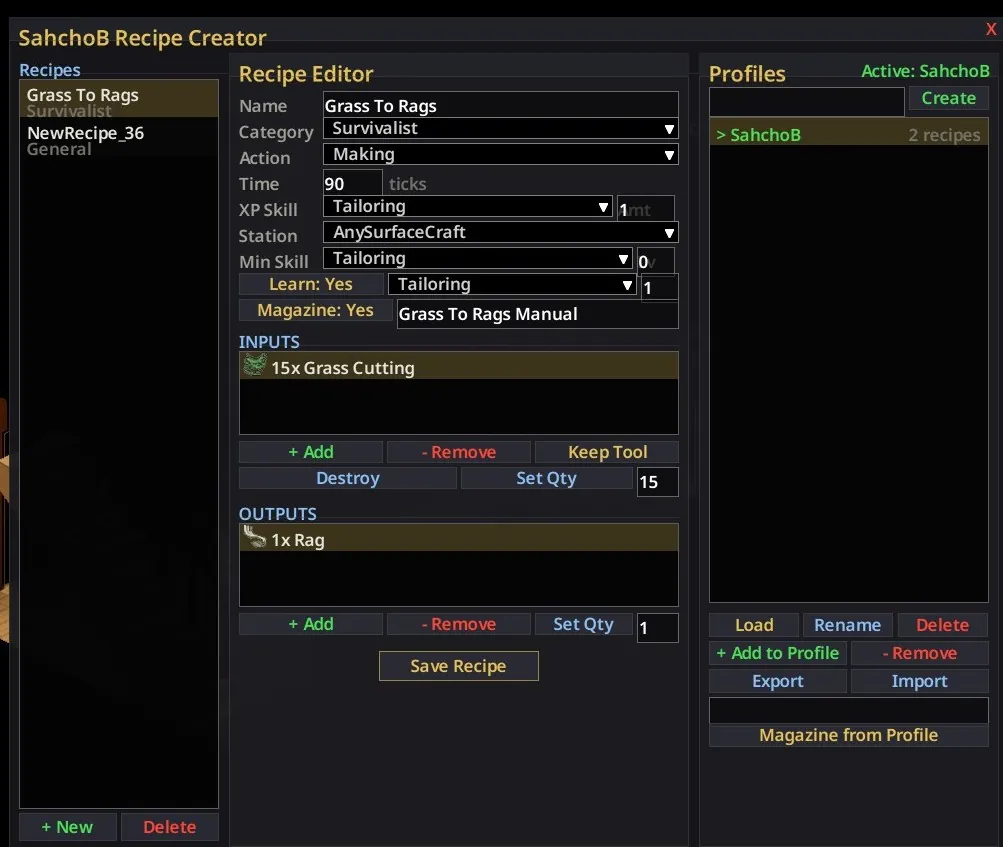
- Press / to open the Recipe Creator UI
- Design recipes with any item in the game as input or output
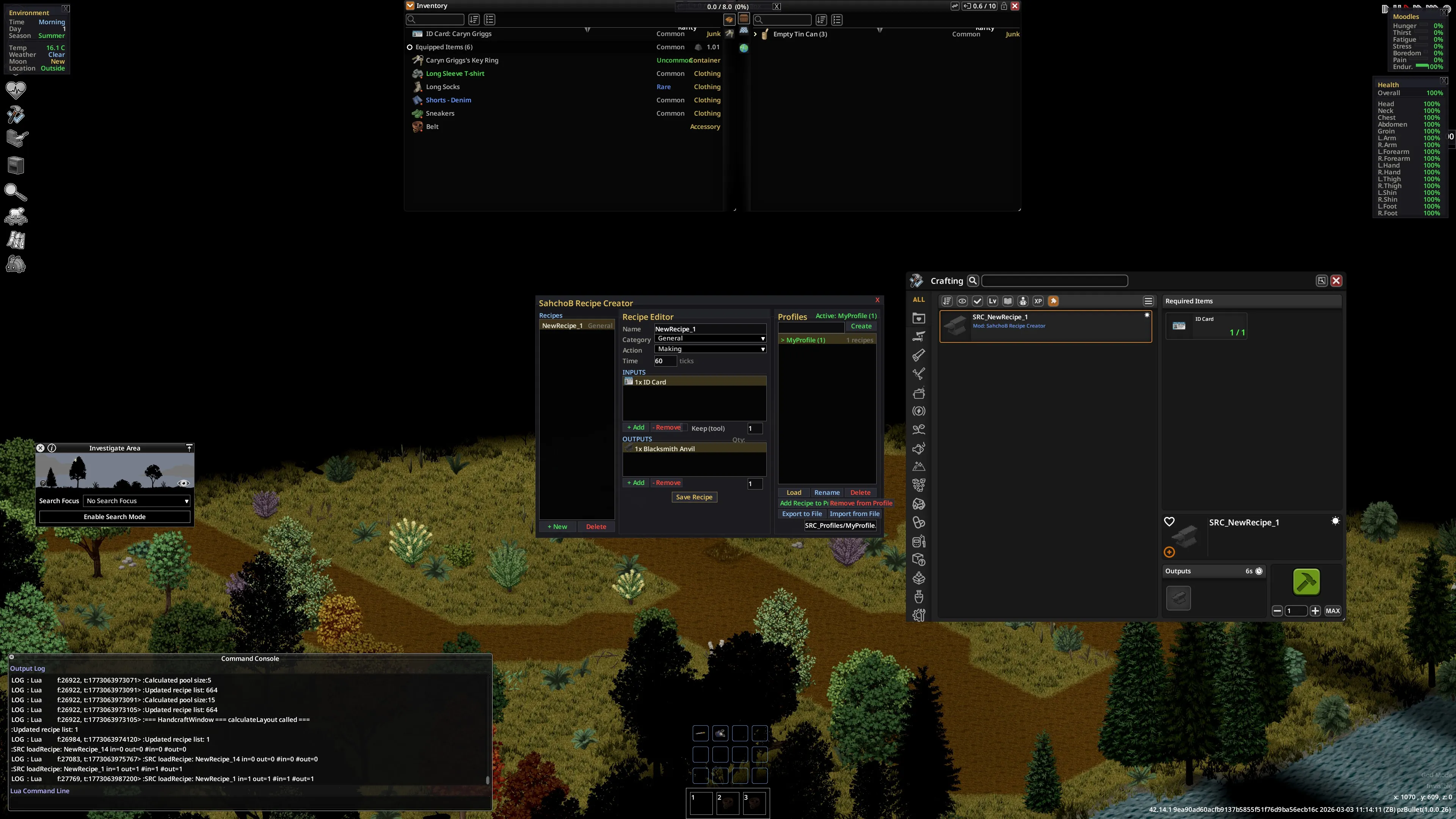
- Recipes appear instantly in the B42 crafting menu — no restart needed
- Delete recipes and they vanish from the crafting menu immediately
- Browse all game items with a searchable item picker (icons + display names)
- Set recipe category, crafting time, and timed action animation
- Mark inputs as "keep" (tool mode — item not consumed)
- Toggle between "whole item" and "drainable uses" input modes
- Set recipes as learnable — players must find a magazine to unlock them
- Create named recipe magazines that teach specific recipes when read
- Organize recipes into profiles for easy management
- Create profile magazines containing all recipes in a profile
- Import/export profiles to share with friends
- All recipes persist across game sessions automatically
- Multiplayer compatible — server syncs recipes to all players
- Clean dark-themed UI matching the PZ aesthetic
How to Use
Creating a Recipe
- Press / in-game to open the Recipe Creator
- Click + New to create a recipe
- Name your recipe in the text field at the top
- Click + Add under Inputs to pick items needed (use the search bar to find items)
- Click + Add under Outputs to pick items produced
- Adjust item counts with the + and - buttons
- Set crafting time, category, and action animation
- Click Save Recipe to save
- Click Refresh Crafting to push recipes live into the crafting menu
Magazine System
- Toggle Magazine: Yes on any recipe to enable magazine creation
- Type a custom name in the text field and click Rename
- Toggle Learn: Yes if you want the recipe to require learning from a magazine
- Click Give Magazine to spawn the magazine into your inventory
- Right-click the magazine and select Learn Recipes Now to learn recipes
- Magazines also spawn naturally in bookshelves, libraries, and desks
Profiles
- Create a profile in the Profiles panel (right column)
- Select a recipe in the list and click + Add to Profile
- Click Make Profile Mag to enable magazines on all profile recipes
- Click Give Profile Mag to spawn a combined magazine with all profile recipes
- Use Export / Import to share profiles with other players
Input Modes
- Whole — counts complete items (default)
- Uses — counts drainable uses from items like gas cans, thread, etc.
- Toggle the mode per-input with the Uses/Whole button
Sandbox Options (Server Settings)
- Admin Only — restrict Recipe Creator to admins/moderators
- Global Recipes — share recipes across all players on the server
- Max Recipes — limit how many recipes can be created (1-999)
- Craft Time Multiplier — scale crafting speed (0.1x to 10x)
- Allow Keep Mode — toggle tool (not consumed) inputs
- Allow XP Awards — toggle XP from custom recipes
- Allow Magazines — toggle learnable magazine creation
Notes
- Works with Build 42 (tested on 42.16)
- Compatible with modded items — any item loaded in your game can be used
- Works in both singleplayer and multiplayer
- First save after install requires one game restart to initialize the script link
- Up to 50 unique named magazines supported per session
Keybind
/ (forward slash) — toggle Recipe Creator UI
Changelog
v2.4.0 — Magazine system overhaul: 50 named magazine slots, per-recipe and per-profile magazines, rename button, magazine toggle independent of learn requirement, server-side recipe learning for multiplayer, fixed magazine drop bug.
v2.3.0 — Sandbox options, global shared recipes for MP, admin-only mode, recipe limits, craft time multiplier, feature toggles.
v2.2.0 — Fixed crafting crash (NullPointerException) on B42. Split Save/Refresh buttons. Recipes now craft reliably without restart.
Workshop ID: 3681858780
Mod ID: sahchobrecipecreator