Music Replacement
Replaces parts of the Project Zomboid soundtrack with music from Darkwood and other games with rich atmospheric music. Urm, I guess that's subjective.
You still need to manually move the files into your Project Zomboid game folder.
Important
Before replacing anything, back up your original .bank files.
Do not rely on verifying game files just to go back to vanilla. It is much easier to copy your original files somewhere safe first, then restore them later if you want the normal soundtrack back.
Also, some music transitions may break. This replacement was put together without fully matching every original music length, so you may notice awkward cuts, bad loops, strange timing, or music triggering in weird places.
If you notice any broken music ingame, please leave a comment and tell me where it happened.
Examples:
- main menu
- combat
- loading screen
- indoor ambient
- nighttime music
- specific event or area
The more specific you are, the easier it is to fix!
How to install
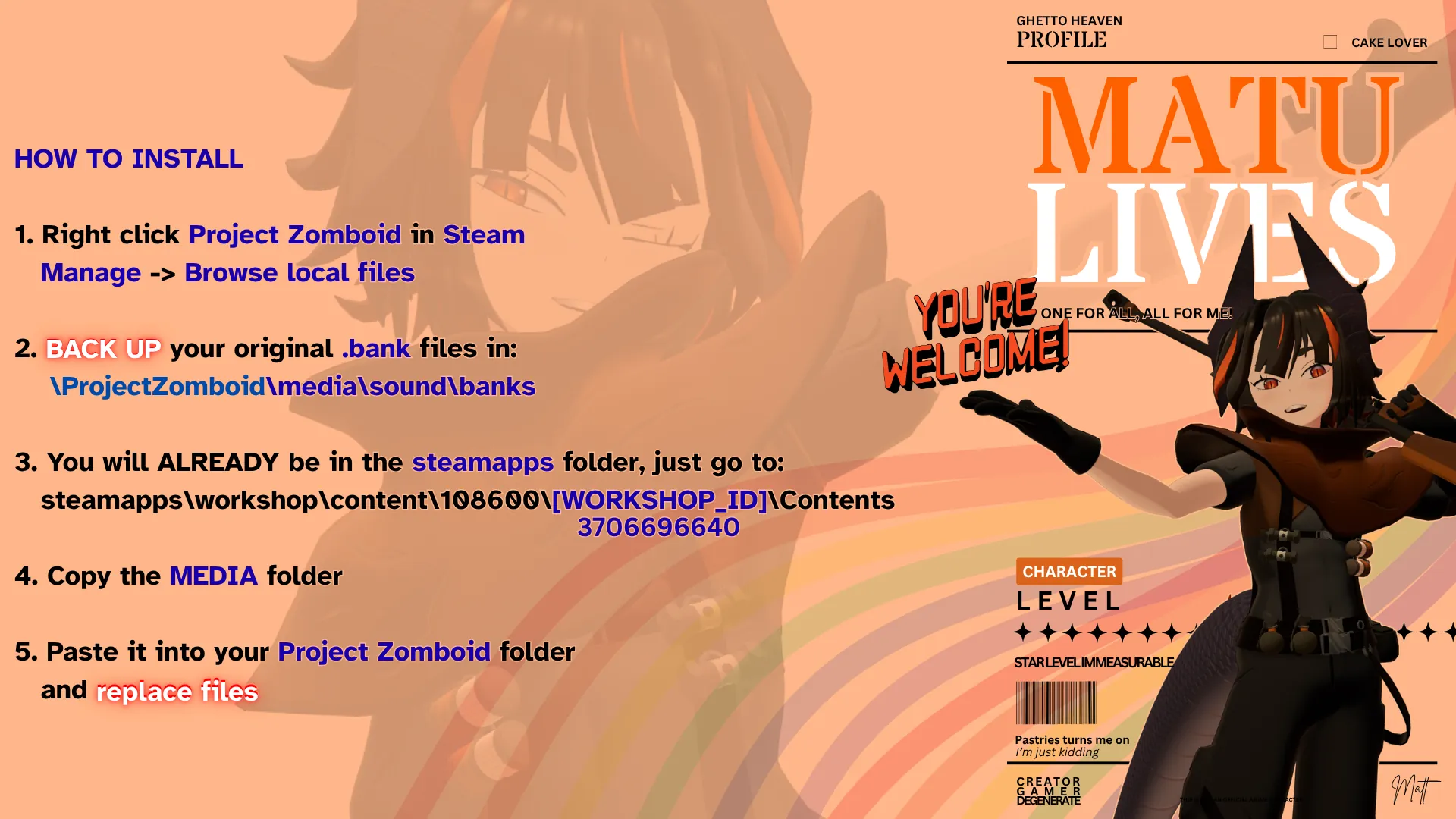
1. In Steam, right click Project Zomboid
2. Click Manage -> Browse local files
3. Back up your original sound bank files before replacing anything
4. Go back to your Steam folder and open:
steamapps\workshop\content\108600\
5. Find this mod's Workshop folder using the Workshop ID listed at the bottom of this page:
[WORKSHOP ID HERE]
6. Open the mod folder, then open:
Contents
7. Copy the media folder
8. Go back to your Project Zomboid game folder
9. Paste the media folder there and allow Windows to replace the existing files
How to uninstall
Restore your backed up original .bank files.
If you did not make a backup, you will need to repair the game installation yourself by verifying games files through your Steam library.
Want to make your own soundtrack replacement?
Here is the simple version:
1. Get the game's music bank file
2. Extract the bank
3. Replace the extracted audio files with your own tracks
4. Keep filenames the same
5. Keep the replacements the same length or shorter than the originals when possible
6. Rebuild the bank
7. Put the rebuilt files back into the game's media folder
8. Test everything ingame, because menu music working does not mean every transition works
If you want to distribute your replacement through Workshop like this one, you can upload it as a Workshop item, but users may still need to copy the files into their game folder manually depending on how the replacement is set up.
How to make your own soundtrack replacement
If you want to replace Project Zomboid's soundtrack yourself, this is the basic process.
What you need
- A .bank extraction/rebuild tool such as Fmod Bank Tools
- An audio editor or converter
- ffmpeg can help a lot if you need to trim or convert tracks
- Your replacement music
- A backup of the original ZomboidMusic.bank
Where the game's music bank is
steamapps\common\ProjectZomboid\media\sound\banks\Desktop\ZomboidMusic.bank
Step 1 - back up the original bank
Before changing anything, copy ZomboidMusic.bank somewhere safe.
Do this first.
It is much easier to restore one backup file than to verify the whole game later.
Step 2 - extract the bank
Open Fmod Bank Tools.
Put ZomboidMusic.bank into the tool's bank folder.
Run Fmod_Bank_Tools.exe.
Click Extract.
The extracted audio files should appear in the tool's wav folder. The tool is specifically built to extract and rebuild FMOD .bank files, and its normal workflow is bank folder -> Extract -> wav output -> Rebuild -> build output. :contentReference[oaicite:0]{index=0}
Step 3 - find the tracks you want to replace
Listen through the extracted WAV files and figure out which ones are menu music, ambient music, combat music, event music, and so on. Personally, I always to a few .wav into a folder that I definitely wanted to change and then made a folder with already replaced music, breaking up the large folder makes it feel less overwhelming.
Keep the original filenames.
Step 4 - prepare your replacement tracks
Convert your music to WAV if needed.
Try to match the original audio specs as closely as possible.
Most importantly:
- keep the same filename
- keep the replacement the same length or shorter than the original
- matching sample rate, channels, and bit depth is the safe option, that means you might not be able to compress audio if that's your thing... bank files are however already much smaller than the folders we will be working in
The rebuilder documentation explicitly warns that replacement audio should match the original expectations and that the replacement duration must be the same length or shorter.
Step 5 - replace the extracted WAV files
Overwrite the extracted WAV files with your new ones.
Do not just throw in random tracks without checking them first!
If lengths or transitions do not line up, you can get bad loops, abrupt cutoffs, silence, or music triggering strangely. Community guides will also warn you about this.
Step 6 - rebuild the bank
Go back to Fmod Bank Tools.
Click Rebuild.
The rebuilt bank should be written to the tool's build folder. The tool UI and documentation show Extract and Rebuild as the normal actions, with rebuilt output going to the build folder. :contentReference[oaicite:4]{index=4}
Step 7 - install your rebuilt bank
Take the rebuilt ZomboidMusic.bank and place it into:
steamapps\common\ProjectZomboid\media\sound\banks\Desktop
Replace the original file.
That manual bank replacement path is also what current B41/B42 Workshop music replacement pages tell users to do. It's even easier for users and friends if you put it into a folder like I did.
Step 8 - test ingame properly
Do not only test the main menu.
Also test:
- menu music
- loading
- daytime exploration
- nighttime exploration
- combat
- panic moments
- indoor areas
- special events if applicable, I saw a 'raiders' .wav which might come in future versions
A bank can load successfully and still break in specific transitions.
Step 9 - fix issues and rebuild again
If anything sounds wrong, go back and adjust the replacement tracks.
Usually the problem is one of these:
- replacement is too long
- replacement does not loop cleanly
- original cue was designed for a transition and your new track was not
- volume balance is off
- if you compressed any files, there might be missing data
Workshop ID: 3706696640
Mod ID: matumusicpack