Safe TechHediffs Patch
Introduction: This mod adds safety checks and optional code replacements to the TechHediff (Prosthetics/Bionics) generation process. The core goal is to prevent Red Errors, Faction loss, or World Generation failures caused by Mod conflicts during prosthetic generation. Please back up your saves and verify RimWorld version compatibility before use.
Primary Issues Resolved
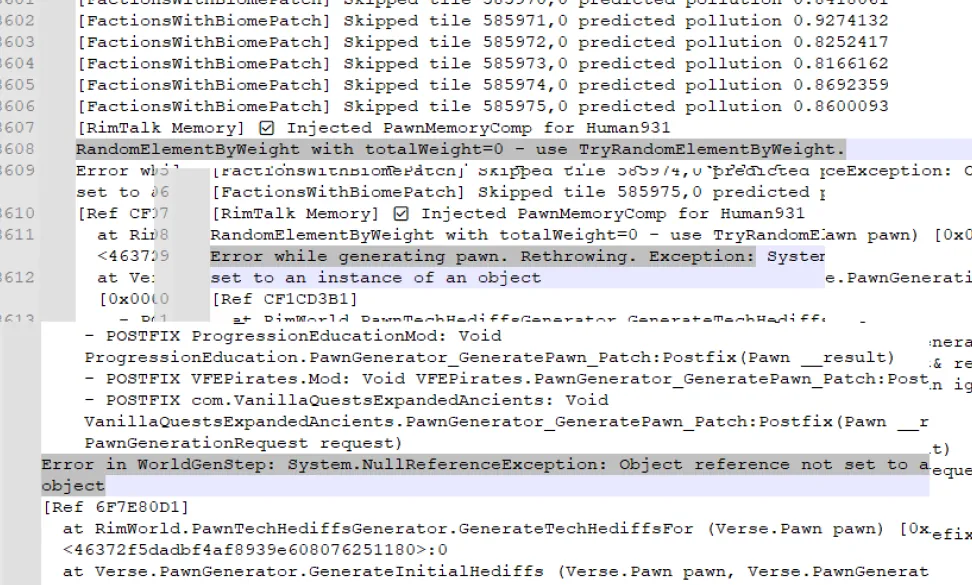
- RandomElementByWeight with totalWeight=0
— When the game attempts to randomly assign a TechHediff to a Pawn, but all available options have a weight of 0, the vanilla logic throws an error and fails to generate the Pawn. This mod skips the invalid generation, ensuring the Pawn spawns successfully (as a "pure flesh" pawn if necessary) to avoid crashes. - System.NullReferenceException
— This error occurs during the Pawn generation stage if certain data is null. The result is the same as the previous issue: the character fails to spawn. This mod safely skips these null references, ensuring the generation process continues smoothly. - Error in WorldGenStep (World Generation Interruption)
— If the errors above occur while generating key characters like Faction Leaders, the entire faction generation may fail, leading to an "Empty World Map." This mod provides special protection for key characters during world generation, significantly reducing the risk of world-gen anomalies caused by these chain reactions.
Core Features
- Smart Tiered Processing: Automatically distinguishes between standard Pawns and critical Pawns (e.g., Leaders). It handles the former silently while providing detailed logs for the latter to facilitate deep troubleshooting.
- Low Performance Overhead: Utilizes a caching mechanism to optimize code execution, ensuring a negligible impact on game performance.
- Configurable Options: Provides various settings allowing you to toggle Tolerant Mode, Debug Logging, Leader Detection rules, and the experimental IL Transpiler.
- No Active Modification of Save Data: This mod operates on the principle of "fixing the process, not the data." If it skips a conflicted prosthetic, the Pawn will simply lack that item, but the underlying save structure remains untouched. Theoretically, it can be installed or uninstalled at any time.
Settings Overview
- Tolerant Mode: Enabled by default. Actively intercepts and handles known tolerable errors to prevent game interruptions.
- Debug Logging: Disabled by default. Only enable this for troubleshooting. When enabled, it outputs detailed reports for all skipped errors to help locate the source of conflicts, but it may generate large log files.
- Broad Leader Detection: Enabled by default. Recommended when using many Xenotype or Faction mods to ensure important Pawns receive extra protection.
- Enable IL Transpiler (Experimental):
An advanced option that attempts to replace the problematic RandomElementByWeight method at the IL (Instruction Layer) level. While it may improve compatibility, it carries a higher risk of conflict with other code-modifying mods. Keep this OFF unless facing persistent issues.
Installation, Compatibility & Troubleshooting
- BACK UP BEFORE INSTALLATION!: Strongly recommended to back up your save and mod list before installing.
- Support: Check the release page for supported RimWorld versions and known conflicting mods.
- Encountering Errors?: If new errors appear after installation, try these steps:
[list] - 1. Go to the mod settings and disable "Enable IL Transpiler."
- 2. If the issue persists, disable "Tolerant Mode."
- 3. Last resort: Disable this mod and reload your backup save.
[*] Effective Feedback: If the core three errors persist, enable "Debug Logging," reproduce the issue, and submit the relevant section of your RimWorld/Logs/Output_Log.txt along with your mod list and game version.
[/list]
FAQ
- Q: Will this mod "tamper" with my character or save data~meow?
A: No~meow, it does not actively modify data. It simply "bypasses" invalid TechHediff data during the Pawn's spawning process. The character might lack a certain prosthetic, but the save itself remains "clean." However, any change carries risk—backups are a good habit! - Q: I still see Red Errors; is the mod useless~meow?
A: This mod focuses specifically on TechHediff generation. Errors caused by apparel, weapons, animations, or other systems may not be handled. Enable "Debug Logging" to help determine the error source. - Q: What is the Transpiler, and why be cautious~meow?
A: The IL Transpiler directly modifies the code for RandomElementByWeight at runtime. It's experimental—I can only ensure it *theoretically* works? If multiple mods modify the same code, it can lead to unpredictable crashes. Use it only if you are feeling adventurous!
Quick Troubleshooting Checklist
- 1. Back up current save.
- 2. Enable Debug Logging in mod settings.
- 3. Reload the game and reproduce the issue.
- 4. Locate the log file (RimWorld/Logs/Output_Log.txt) and copy the relevant segment.
- 5. Provide: RimWorld version, Mod list, Screenshot of Mod Settings, and the Log segment.
Final Disclaimer:
This mod is a "fail-safe" solution; it ensures the game continues via tolerance mechanisms but cannot fundamentally "cure" data conflicts in original mods. Please back up before use and adjust settings as described if compatibility issues arise.