Velocity pivot controller intended for turrets, has custom settings to control how it behaves
[TURRET TRIGGER ALIGNMENT]
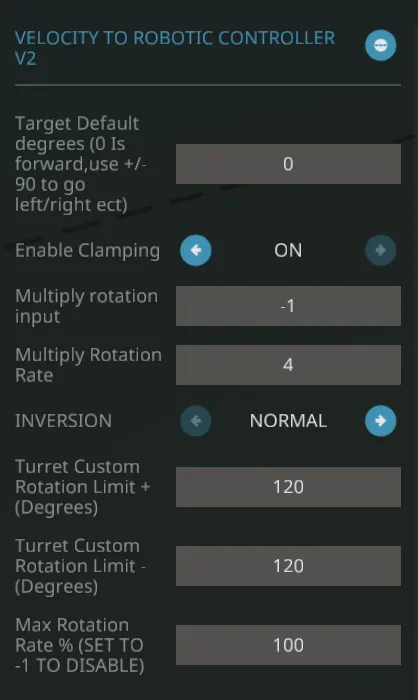
-Good for multi-turreted vehicles, Will only output a signal to the trigger if the camera is looking in a direction the turret can aim at
[INVERSION]
Allows for rearward facing turrets, simply rotate the turret that you have built forward around to face backwards and set to inverted
[TARGET DEGREE DEFAULT]
-The default position the turret is facing when the controller is set to off
-When having turrets set to face sideways (done through turret rotation limits by setting one of the values to negative), this can be used to keep the turrets facing within their limited setting if desired. Great for multi-turreted vehicles to prevent turrets from shooting your own vehicle before they can align to their set limitations
[CLAMPING SYSTEM]
-Enable clamp turns on the clamping system, will not interfere with trigger alignment however so pivot can rotate in that direction but trigger alignment will still work within the set limitations
-Positive and negative limits are pretty self explanatory, simply set the values for each direction as you desire to control where the turret can aim when activated.
-Set a value to negative to force pivots to look in the opposite direction, good for sideways facing turrets
[Tuning]
-Multiply turret input directly multiplies the input by the set value
-Multiply turret rotation rate multiplies the speed the turret wants to rotate at, key for tuning turrets that are overswinging their target
-Max rotation rate applies a clamp over the speed of rotation rate. Also useful for fine tuning or if you want a turret to look like its heavy (such as a battleship main battery), whist still accurately aiming at a target). Set to -1 to disable it