Loot Goblin 2000 for Project Zomboid B42 [SP/MP]
Your trusty little companion for finding all the good stuff.
Info
Ever spent 10 minutes browsing your 50 containers only to realize you have no idea which box that screwdriver ended up in? Loot Goblin 2000 has your back.
watch the intro video that covers the basics
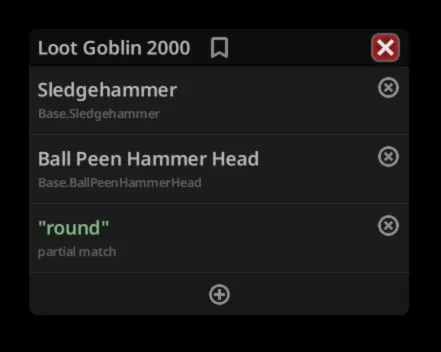
This mod adds a handy floating panel that lets you search for any item by name (or partial name / item ID) and instantly see which nearby containers hold it. Found what you're looking for? Grab one, grab all, or highlight the item in the container. You can track multiple items at once by stacking search blocks in the panel, so your inner goblin can be greedy about all the things simultaneously.
⚠️ Important load order note: Since Loot Goblin 2000 builds a cache of all available items on startup, it should be placed below any mods that add new items in your mod load order.
The mod requires NeatUI Framework as a dependency.
Supported game versions: 42.14 and up (tested on 42.16).
Usage
Once in-game, press ; (semicolon) to toggle the Loot Goblin 2000 panel open/closed. You can rebind this in Options → Mod Options → Loot Goblin 2000 — all options come with tooltips explaining what they do, so go poke around in there.
Quick rundown:
- Type an item name or ID into the search box — top 5 matches appear instantly
- The first result is always a partial match option (finds anything containing your query)
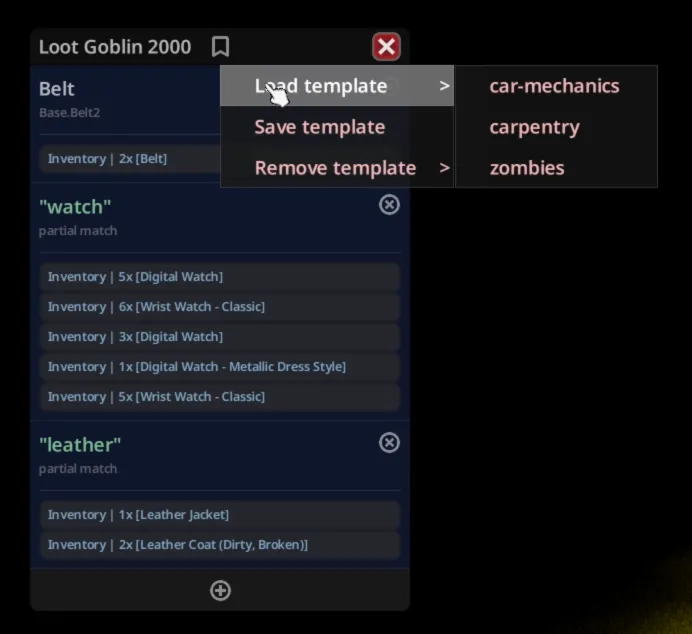
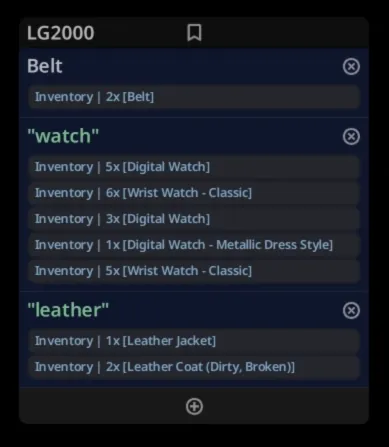
- Select an item and the block switches to finding mode, scanning nearby containers in real time
- Use the grab all / grab one / locate buttons on each found entry
- Press ' (apostrophe, also rebindable in mod options) to grab all found items from all containers in your proximity at once
- Click the plus button to add another item to track — stack as many as you like!
Templates let you save and reload your favourite item lists. Hit the template button in the panel header to save your current search setup, load a previously saved one, or clean up old ones you no longer need. The template can also be quickly loaded from the search box by writing its name.
Each search block has an icon button (left of the remove button) that lets you set a specific quantity that you need. For example, set it to 1 for a hammer when preparing for carpentry work (you don't need 10 hammers at once for that, right?) — once your inventory holds at least that many, the block turns blue permanently and the grab-all hotkey skips it. Click the quantity badge to change or clear the amount. The needed quantity is saved in templates and restored when you reopen the panel.
Support & Contribution
GitHub Repository[github.com]
Found a bug? Something not working right? Head over to GitHub Issues[github.com] — that's the only place where support can be provided, so please don't rely on Steam comments or workshop discussions for help. I might or might not answer there.
Want to make the mod even better? Pull requests are very welcome! Whether it's a bug fix, a new feature, or just tidying something up — contributions are always appreciated.
Credits
- Idea, design, implementation: deseven[d7.wtf]
- Code: Claude[claude.ai]
- Icons: Boxicons[boxicons.com]
- Notification sounds: Freesound[freesound.org]
- Intro video music: Gregor Quendel[www.classicals.de]
Workshop ID: 3694894350
Mod ID: LootGoblin2000