Loot Filter
Tired of clutter hiding the good items when looting? Or maybe you dont want to add hundreds of items to the unwanted list manually every time you play. Loot Filter is desinged to be a lightweight, highly customizable utility to bring some QoL to your looting game. The new Unwanted system is cool, but if adding things manually, the game treats each color of underwear, all the different rings, fliers etc. as unique items for the purpose of the system, which makes using it overly clicky. Well.. not anymore.
Update 1
After a lot of testing, I am finally bringing this update to the Workshop.
- Packet Queue for Multiplayer - As adding/removing items from the unwanted list aggresively saves to the server, I had to introduce a queue. Modifying the filter's settings on MP, adds/removes one unwanted item per second so the server does not get flooded with packets. I will probably make this value editable in the future in Sandbox Settings
- New Subcategory: Skillbook - This new subcategory, when enabled, will automatically add skill books and recipe magazines to the unwanted list as you pick them up, and will not pick up any duplicates from the container, both when pressing Loot All or dragging.
- New Local Save System - Moving away from the server save as it does not need to know about our internal lists of items anyway. The system has been remade to be 100% local and the settings are exclusive to the save/server. You can find the save files in User/Zomboid/Lua. In case you have been using the previous version, the update includes a conversion script so you will retain your settings after the update.
- Toggle All Button - A new button in the UI, that allows to quickly toggle all categories ON or OFF (Don't forget to press Apply).
- Minor updates to item lists - The premade Subcategories are still looking at an overhaul in the near future as many items are still missing, but a few were added.
The mod
This mod expands on the vanilla Unwanted system, allowing for semi-automatic Unwanted List management, and provides the ability to filter the unwanted items from the loot panel entirely, not just changing the text color.
Key Features
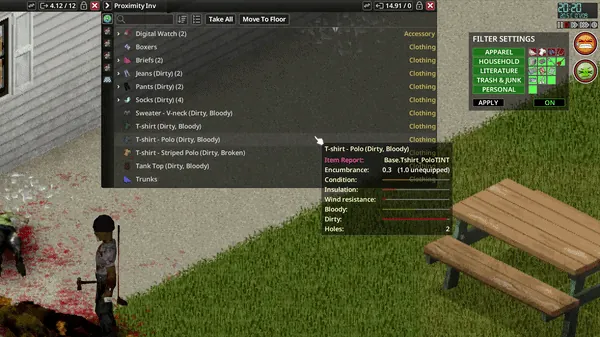
- Deep Customization: Filter by specific subcategories including Underwear, Cotton Clothing, Jewelry, Magazines, Newspapers, or Scrap junk, including a Personal category for all items marked as unwanted manually via the right-click context menu.
- Live UI Toggles: Change your filtering options on the fly via a dedicated UI panel. No need to quit to the main menu to adjust your settings.
- Hiding Toggle: A dedicated toggle allows you to hide unwanted items from the Loot Panel while keeping them visible in your Player Inventory. No unnecessary CPU load.
- Transfer All: Since the game already ignores unwanted items, the "Transfer All" button will only pick up what you want. No more accidental hoarding!
- Cursed Item Variants: Many of the newly added variants of items such as all the different magazine issues are very hard to work with, currently some items get marked as unwanted as the player encounters them in the world for the first time from a lack of a better solution. Hopefully with future patches the unwanted system will be more mature.
Compatibility
- Tested Version: Fully functional in B42.15.3 and B42.16.0 (Singleplayer and Multiplayer (Steam Hosted and Dedicated)).
- Mod Compatible: Confirmed working with CleanUI and Proximity Inventory.
- Just in case: Designed with compatibility in mind but in the unlikely event you encounter a mod that conflicts with Loot Filter, please report it in the comments section!
How to Use
- Open your Filter Settings UI by pressing the 0 key by default.
- Use the Loot Filter UI to toggle your desired categories and press apply, the game will calculate your new list, it might take a second or two if you change many categories.
- Items in those categories will get marked as unwanted, and filtering will be very fast.
- You can hide or reveal Unwanted items by pressing the O key by default.
- Add your own Unwanted items to the list by right clicking an item and selecting More>Set Unwanted
- Hotkeys can be changed in the Mod Options section of the Main Menu.
Note: This mod is currently in its initial release phase. If you have suggestions for categories, or have otherwise found a bug or some unintended behavior, please leave a comment!
Special thanks to the survivors in the PZ Modding Discord!
Workshop ID: 3696959301
Mod ID: LootFilter42