[B42] RV Interior Manager
A companion admin panel for PROJECT RV Interior (and its expansion mods). Gives server admins full visibility and control over every vehicle-to-room assignment in the save, with real-time position tracking, sorting, filtering, and manual assignment tools.
Requirements
Mod
Workshop ID
PROJECT RV Interior
Optional but recognised: RV Interior Update 1 (rvupdate) · RV Interior Update 2 (rvupdate2)
Features
Admin Panel
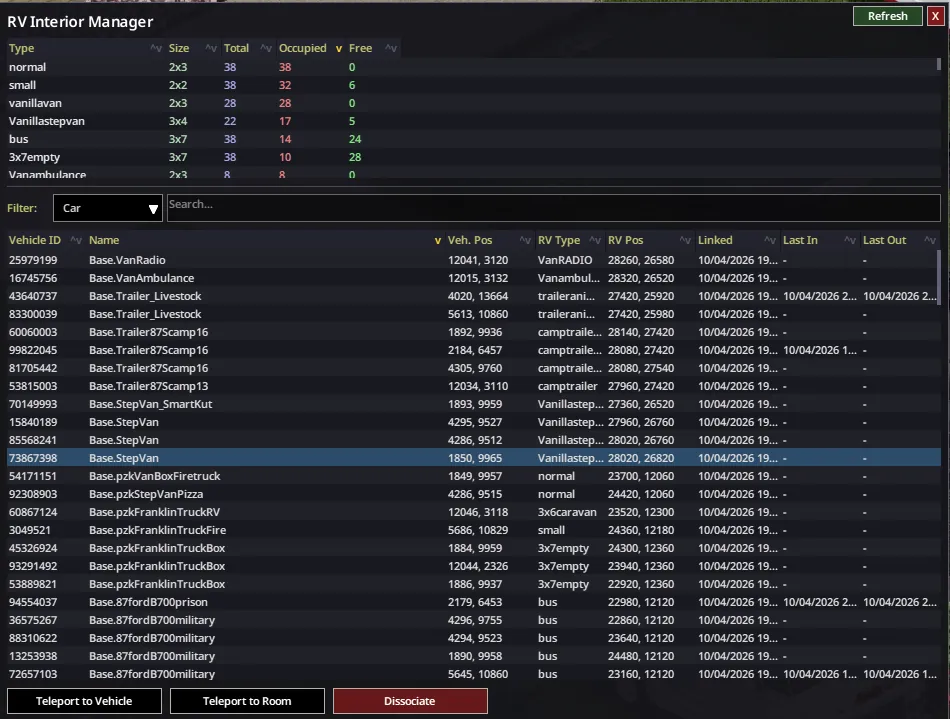
Open via the RV Interior Manager button in the Admin Panel (admin/moderator only).
Availability summary table
- One row per interior type (Normal, Bus, Small, Caravan, etc.)
- Shows room dimensions, total slots, occupied, and free counts for each type
- Click any column header to sort ascending/descending
Assignments table
- Lists every vehicle that currently has an interior room assigned
- Columns: Vehicle ID · Name · Vehicle Position · RV Type · Room Position · Linked At · Last Enter · Last Exit
- Click any column header to sort; click again to reverse
- Hover over any cell to see the full untruncated value in a floating tooltip
Filter bar
- Search across: Car name, Vehicle ID, RV Type, Room location, Vehicle location, Linked At date, Last Enter, Last Exit
- Type any partial string to filter the list in real time
- Type - to find records with empty fields (e.g. vehicles never entered, or rooms without a linked date)
Action buttons
- Teleport to Vehicle — teleports the admin to the vehicle's last known world position
- Teleport to Room — teleports the admin into the interior room
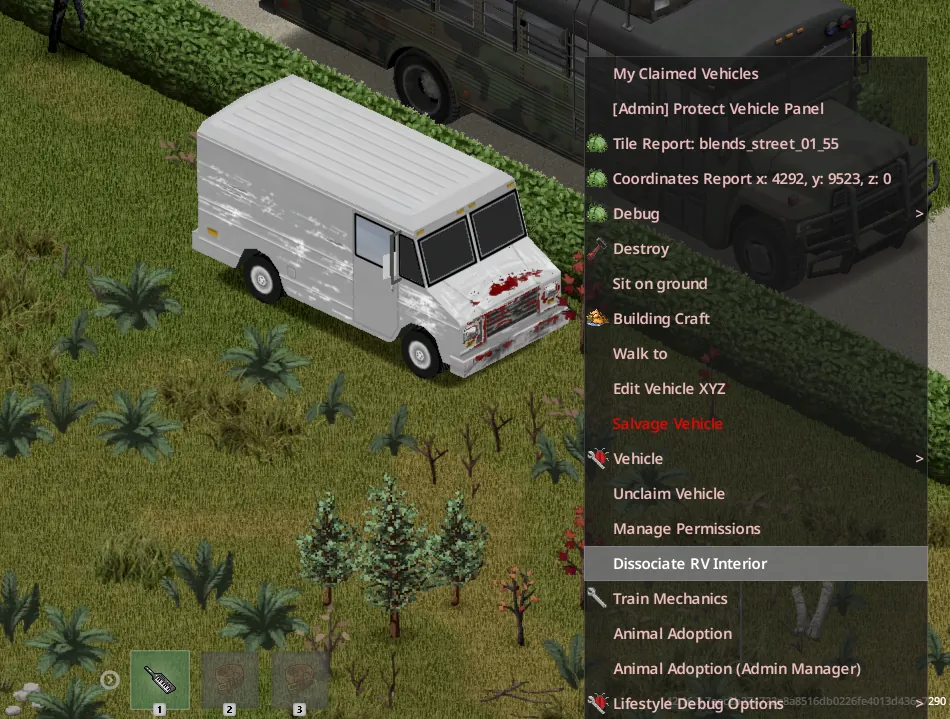
- Dissociate — frees the room assignment; the vehicle will need a new room before anyone can enter it again
- Force Idle Check — runs the idle room cleaner immediately instead of waiting for the next hourly cycle
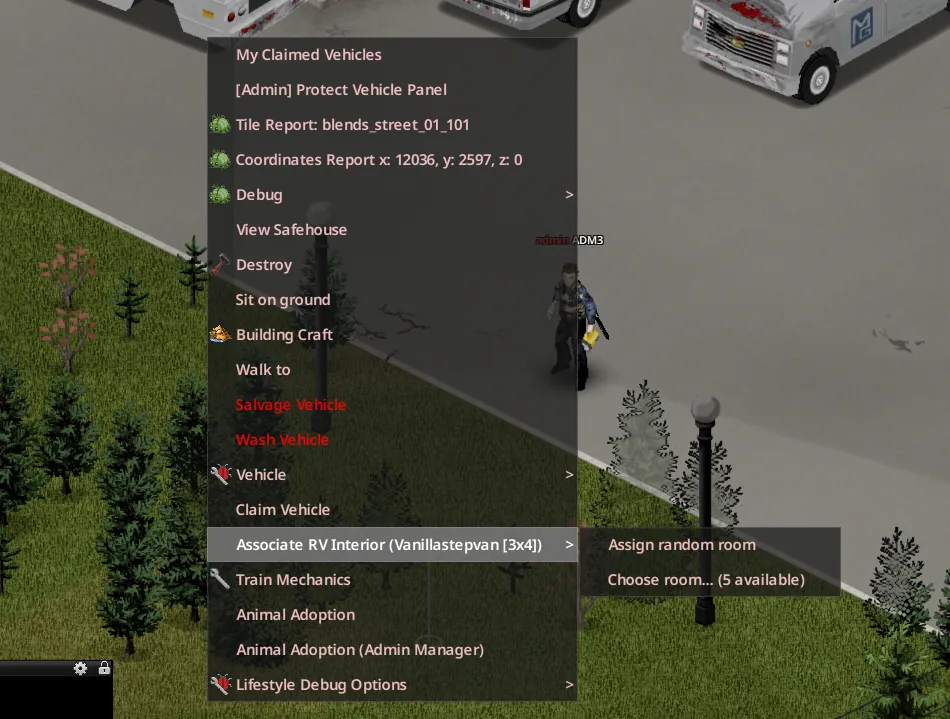
Manual Association (context menu)
Right-click any supported vehicle from outside → Associate Interior:
- Random room — assigns the next available slot automatically
- Choose room… — opens a room picker showing all free slots for that type, with region filter (Main / Update 1 / Update 2) and coordinate search; confirm to assign that specific room
Sandbox Options
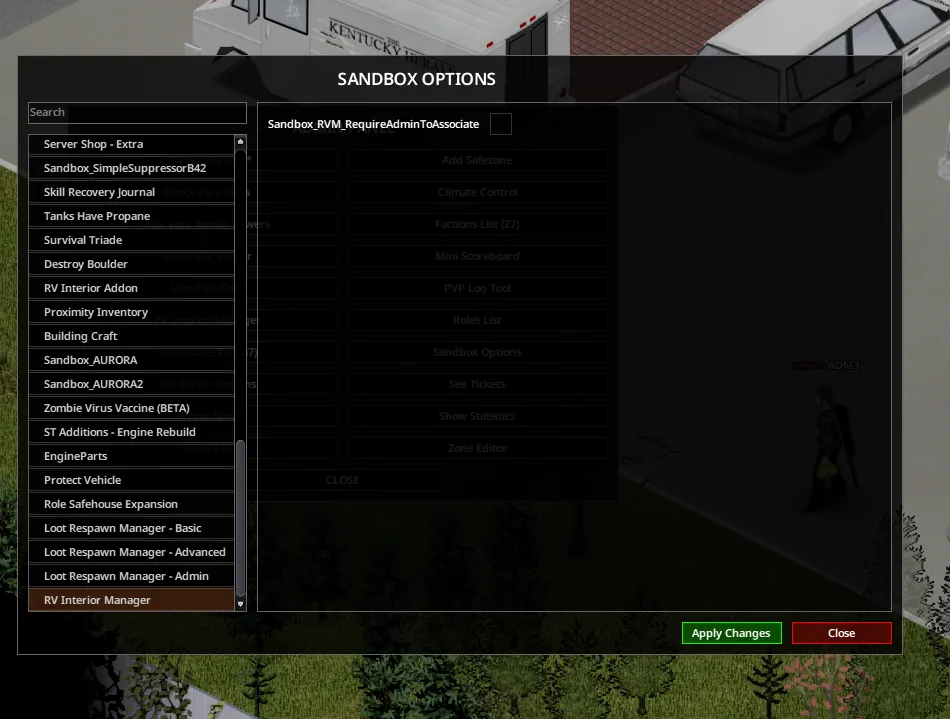
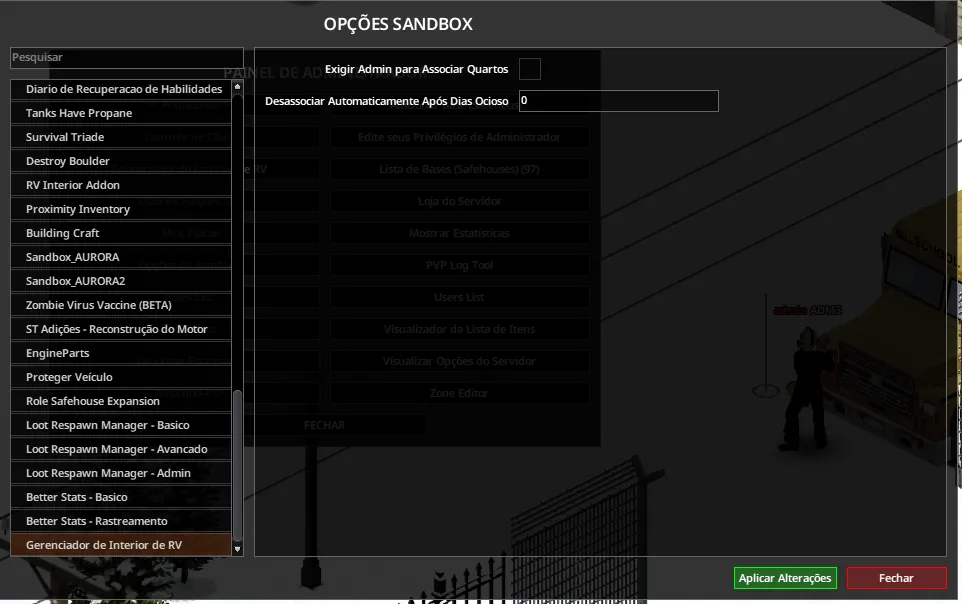
Require Admin to Associate (Sandbox → RV Interior Manager → Require Admin to Associate Rooms, default: OFF)
When enabled, only admins and moderators can associate a room to a vehicle. Regular players cannot enter an RV that has no room assigned — they are blocked before the teleport happens and receive an on-screen message. They stay in the world until an admin associates the vehicle.
Idle Room Cleaner (Sandbox → RV Interior Manager → Idle Cleanup Days, default: 0 = disabled)
Automatically dissociates rooms that have not been entered for the configured number of real-world days.
- Uses Last Enter date as the reference; falls back to Linked At if the vehicle was never entered
- Runs once on world load and every ~60 minutes during the session
- Every dissociation is logged to ~/Zomboid/Logs/RVM_IdleCleanup.log with full details
Short FAQ
Game version: B42 Unstable (latest)
Multiplayer: Yes
Added midgame: Yes — pre-existing room assignments will show up in the panel immediately. Some fields (vehicle name, last position) will populate as vehicles are loaded into the world. The Linked At date is the only field that cannot be recovered retroactively; it will be set to the first enter/exit event recorded after this mod is installed.
Technical Information
Workshop ID
3704055215
Mod ID
rvinteriormanager
Version
0.2
Build
42.16+
Permissions for Modders
Ask for permission.
This mod may not be included in modpacks, collections distributed as a single download, or any form of redistribution without the express permission of the original creator. Extensions and patches are also subject to this restriction. Having received permission, credit must be given to the original creator both within the mod files and wherever the mod is published online.
Tested On
Dedicated server (Linux) · Build 42.16+
Known Issues
- Context menu shows "Associate" on an already-assigned vehicle (pre-existing worlds). This can happen the first time you right-click a vehicle whose chunk has not been loaded since the mod was installed — the client's local cache hasn't synced yet. Simply right-clicking a second time will show the correct Dissociate option. No data is lost.
Workshop ID: 3704055215
Mod ID: rvinteriormanager