ScubaSteve's Performance Mod
Performance optimization tool for late-game saves
No longer working on this mod
Overview
Struggling with late-game lag? This mod provides a suite of optimization tools and one-click cleanup utilities to keep your colony running smoothly, even with hundreds of pawns, massive bases, and heavy mod lists.
A restart of your game after changing a preset is not required, but may improve its effectiveness. Please experiment with this until the mod suits your needs.
Features
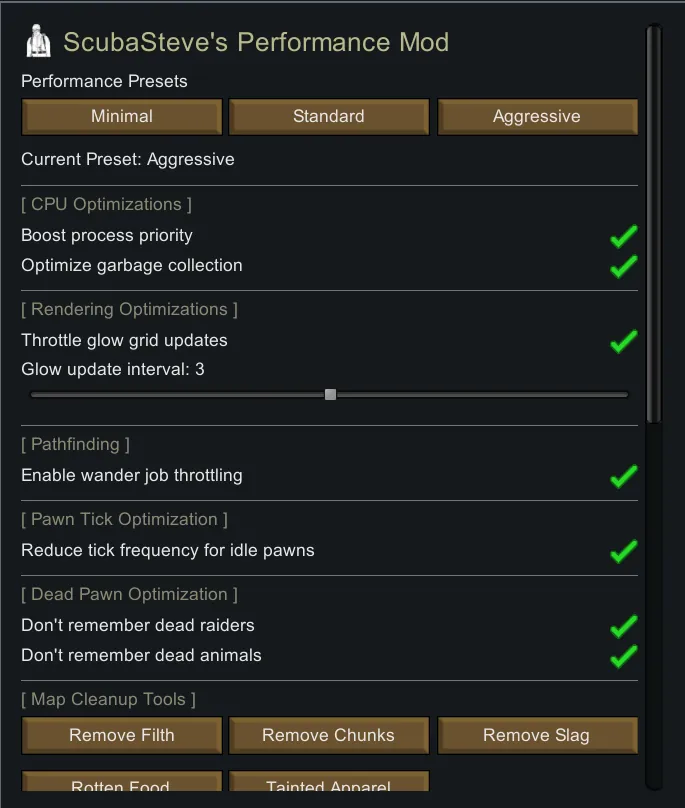
Performance Presets
- Minimal - Light optimizations for stable gameplay
- Standard - Balanced performance improvements (recommended)
- Aggressive - Maximum optimization for struggling systems
CPU Optimizations
- Boost process priority - Gives RimWorld higher CPU priority in Windows
- Garbage collection optimization - Reduces GC pauses that cause stuttering
Rendering Optimizations
- Throttle glow grid updates - Reduces lighting recalculation frequency
- Configurable update intervals
Pawn Tick Optimization
- Wander job throttling - Reduces pathfinding overhead for idle pawns
- Idle pawn tick reduction - Pawns doing nothing tick less frequently
Dead Pawn Memory Management
- Automatic cleanup of dead raiders from memory when corpses are destroyed
- Automatic cleanup of dead wild animals from memory when corpses are destroyed
- Prevents WorldPawns bloat in long-running saves
One-Click Cleanup Tools
Map Cleanup:
- Remove Filth - Clears all dirt, blood, and debris
- Remove Chunks - Removes stone chunks cluttering your map
- Remove Slag - Cleans up slag chunks from mining/combat
- Rotten Food - Removes all rotten items
- Tainted Apparel - Removes all tainted clothing
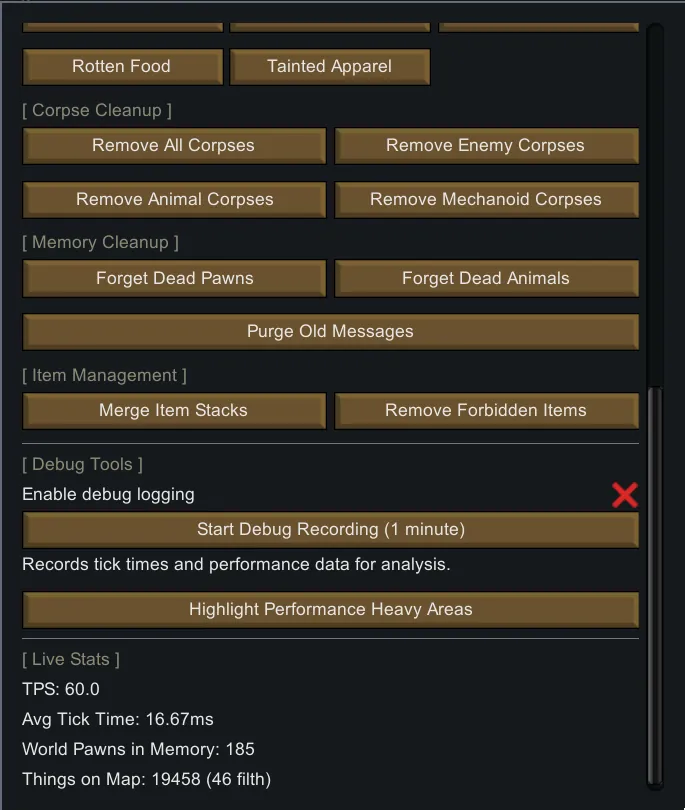
Corpse Management:
- Remove All Corpses
- Remove Enemy Corpses
- Remove Animal Corpses
- Remove Mechanoid Corpses
Memory Cleanup:
- Forget Dead Pawns - Purges dead non-colony pawns from memory
- Forget Dead Animals - Purges dead wild animals from memory
- Purge Old Messages - Clears the message log
Item Management:
- Merge Item Stacks - Consolidates nearby item stacks
- Remove Forbidden Items - Clears all forbidden items from the map
Debug & Monitoring Tools
- Live performance stats (TPS, tick time, pawn counts) (Press F9)
- World pawn memory tracking
- Map object counters (filth, items, pawns, buildings)
- Performance recording for diagnostics (DEBUG Function for Mod Developers)
- Performance heavy area highlighting (Experimental)
How To Use
- Subscribe and enable the mod
- Restart your game
- Load your save (or start a new game)
- Click the Performance tab on the bottom bar (ScubaSteve Icon to the right)
- Choose a preset or configure individual settings
- Experiment with the settings (A game restart is not required, but may have positive effect on the preset. Please experiment with this until the mod suits your needs.)
- Use cleanup buttons as needed
Compatibility
- Safe to add to existing saves
- Compatible with most mods
- Designed to work alongside heavy mod lists
- Uses low-priority Harmony patches for maximum compatibility
Load Order: Load after Harmony and core RimWorld DLCs.
Supported Versions
- RimWorld 1.6
Requirements
- Harmony (Required)
Tips for Best Results
- Restart your game after enabling the mod for best effect
- Use the Aggressive preset for colonies with 50+ pawns
- Run cleanup tools periodically on long-running saves
- Monitor WorldPawns count - if it's over 1000, use memory cleanup
I have made this mod because I feel like other Performance Optimizing mods don't 'Hit the spot'. Using this mod you can continue playing your late-game gameplay without having major performance issues anymore.
Questions, suggestions, or bug reports? Leave a comment below!
Your feedback would be appreciated!