Want custom tattoos in RimWorld without writing a single line of code or XML?
This mod does all the heavy lifting for you. Drop your PNG images into a folder, start the game, and your tattoos are ready to assign to any pawn — automatically, no setup required.
Designed for artists, players, and modders who want full creative control without needing to know anything about RimWorld's modding system.
HOW TO ADD TATTOOS
──────────────────────────────────────────────────────────
Navigate to the mod's Textures folder. Inside you will find two subfolders:
📁 Tattoos/Body/ — for tattoos shown on the pawn's body
📁 Tattoos/Face/ — for tattoos shown on the pawn's face
Place your PNG images in the appropriate folder and the mod registers them
as tattoos automatically when the game starts.
For tattoos adjustment turn on corresponding feature in game settings.
That's all there is to it.
Recommended PNG image size 512x512 pixels.
TWO WAYS TO ORGANISE YOUR FILES
──────────────────────────────────────────────────────────
You can structure your tattoo images in whichever way feels more comfortable.
Both formats work side by side in the same folder.
◆ FLAT LAYOUT (Traditional)
──────────────────────────────────────────────────────────
All three directional images sit together in the same folder,
distinguished by a suffix at the end of the filename:
Tattoos/Body/
├─ Custom_south.png ← pawn facing you
├─ Custom_north.png ← pawn facing away
└─ Custom_east.png ← pawn facing right
The base name (Custom) becomes the tattoo's name in-game.
You only need to provide the directions you have artwork for —
if _north, _south or _east are missing, the mod substitutes a blank
so the tattoo simply becomes invisible from that angle instead
of causing an error.
◆ SUBFOLDER LAYOUT (Directory)
──────────────────────────────────────────────────────────
Each direction gets its own subfolder. All three images share
the same filename, placed in the matching folder:
Tattoos/Body/
├─ south/
└─ Custom.png ← pawn facing you
├─ north/
└─ Custom.png ← pawn facing away
├─ east/
└─ Custom.png ← pawn facing right
This is the cleaner option if you are organising a large pack
with many tattoos, since each tattoo's variants are grouped
together visually in the file system.
FEATURES
──────────────────────────────────────────────────────────
✔ Add unlimited custom body and face tattoos — no coding required
✔ Supports both flat and subfolder file layouts
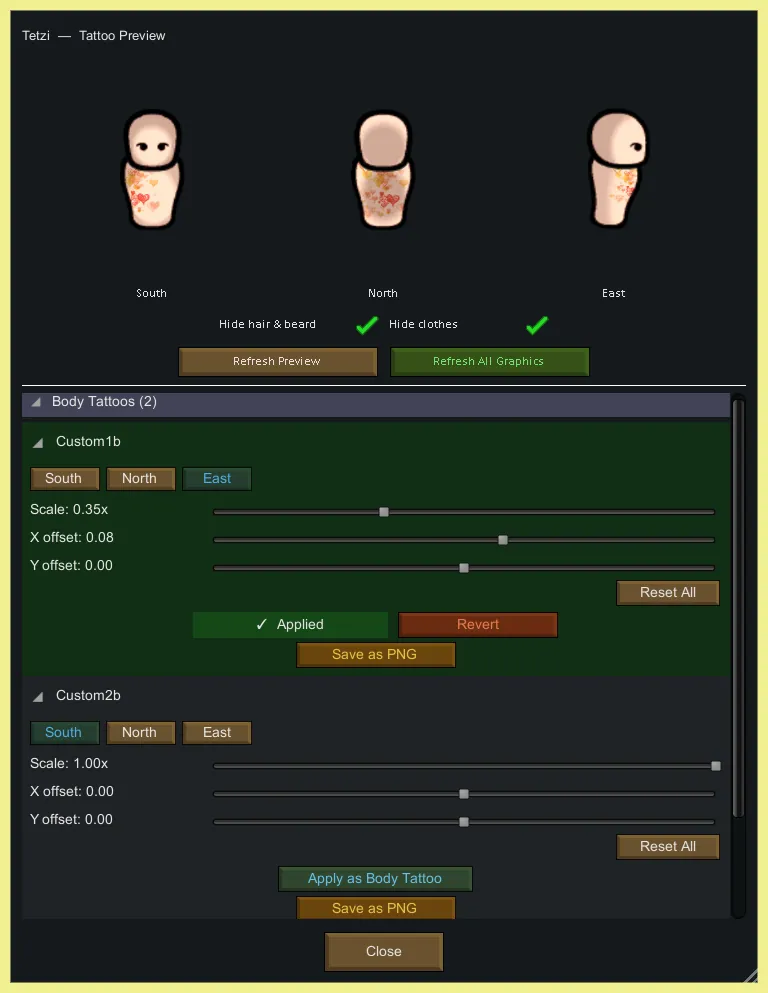
✔ Adjust scale and position per tattoo, per direction, in mod settings
✔ All changes apply without restarting the game
✔ Live preview window — open directly on any pawn from their action bar
✔ Preview lets you hide hair, beard, and clothing for a clear view
✔ Apply any tattoo to a pawn from the preview window and revert instantly
✔ Settings are saved automatically between sessions
✔ You could save adjusted tattoos for future use (Inside the mod folder under Saves/Body/ or Saves/Face/, named with the standard directional suffixes so they can be dropped straight into a new tattoo set)
If you are using Multi-Layered Tattoos mod then you need to clear cache in corresponding settings there for tattoo to update its view after changes.
FOR MOD PACK CREATORS
──────────────────────────────────────────────────────────
This mod is designed to work as a framework. If you want to publish a tattoo
pack that other players can drop into their game, simply create a mod that
lists this one as a dependency and include your PNG files in the same folder
structure described above. No additional setup is needed on your end.