Are you a Loot Goblin?
Do you like to hoard troves of human leather for your colonist hat needs?
Do you want to keep copious amounts of silver, just to not give any to those pesky beggars?
Do you prefer to lose humongous amounts of raw meat to a solar flare instead of feeding your prisoners?
Say no more! I bring you the ultimate solution for your stack-size altering needs.
Similar to OgreStack, Stack XXL, and other Stack Size Altering mods.
Except Nothing is hardcoded.
Also won't eat your 10000 meat stack if you change the settings and lower the value before loading the game. :'(
Want to exclude all items of one particular mod from being altered?
You can. Just create a LootRuleDef XML file for it.
Want to create your own category to change stack sizes?
You can. Just create a LootCategoryDef XML.
Want to prevent Loot Goblin users from altering stack sizes?
You can. Just bundle an "Ignore" rule with your mod.
Want to say no to the modder, and alter the stack size anyway?
You can. Just create a higher priority rule to overrule their rule.
Loot Rules are applied on the whole thing category hierarchy, instead of looking just at the topmost category.
- A Loot Rule can contain: category, name, flags, and mod filters
- Multiple matches in a single rule are "And"-ed together
- A Rule can contain a priority number (defaults to zero), lower priority rules are replaced in favor of higher priority ones.
- Child-category rules are prioritized over their parent ones.
- DefName based rules are prioritized over category rules.
FAQ
> Safe to Add Mid-Game?
Yes. Don't forget to change the rules to your liking, they default to Vanilla.
> Safe to Remove Mid-Game?
Yes, as long as you reset stack sizes back to 1x AND LOAD YOUR SAVES AND RESAVE THEM ONCE, so the mod can split your giant stacks into vanilla-sized stacks.
Also you'll need to do a whole lot of hauling after that.
Failure to do so will make it so that Tynan will steal your stacks and leave a message in the error log on your next game load.
> Is it 'X' Compatible?
Most Likely. As long as the mod has their items categorized in a vanilla-fashioned way, you at least won't get food mixed with metals, since the whole category hierarchy is considered for sorting.
Tested it on a 350 mod load order and found only like, 10 to 15 uncategorized items.
Some mods may need special treatment for miscategorized items, leave a message, create your own LootRulesDef xml mod and share it, or create your own xml defs and don't share it. Your call.
> Is it Combat Extended Compatible?
Yes.
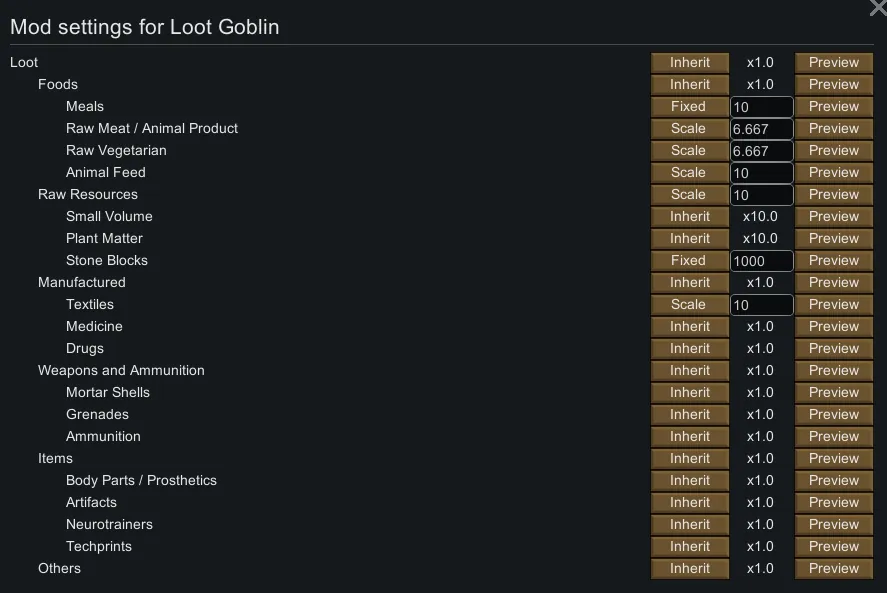
> What is "Inherit" on the settings
Inherit will apply the same rule as its parent category. Say, setting "Scale" to "2" for Food, items under Food with Inherit will also have a "Scale by 2" stack size.
> Can i check what my stack sizes will be while configuring?
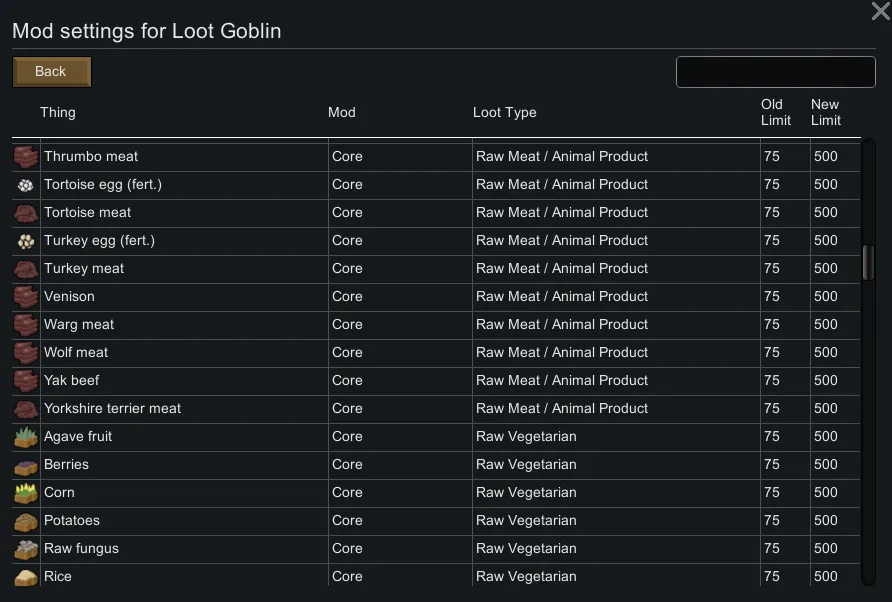
Yes. Press the Preview button, a page with a table consisting of [Thing, mod, old stack, new stack] will show. There's a name filter box up top too.
> Can i change settings with the map loaded?
Yes. Just open the menu and configure it. No need to reload the game after either.
> How do i create my own category?
Check the Built-in categories XML, but it consists of a def in the form of:
<LootGoblin.LootTypeDef>
<defName>[Your Category DefName]</defName>
<label>[Label in the Settings Menu]</label>
<parent>[Parent Category, use LG_Type_Everything if you want a Root Category]</parent>
<sort>[Sort order in the Settings menu, ascending, Lower is on top]</sort>
</LootGoblin.LootTypeDef>
> How do i create my own Rules?
Check the Built-in rules XML, but it consists of a Rules def, with as many rules in it as you need in the form of:
<LootGoblin.LootRulesDef>
<defName>[Your Rule DefName]</defName>
<rules>
<li>
<match>
<!-- Use at least one match, multiple options are and-ed together -->
<name>[DefName based Rule RegEx, can be empty]</name>
<category>[ThingCategoryDef based Rule RegEx, can be empty]</category>
<mod>[mod package id, not a RegEx, can be empty]</mod>
<flags>[Misc flags, for now only smallVolume, can be empty]</flags>
</match>
<lootType>[Loot Category Def]</lootType>
</li>
...
<li>
<match>
...
</match>
<lootType>[Loot Category Def]</lootType>
</li>
<rules>
</LootGoblin.LootRulesDef>