Maiya Labeler 麦丫标签机
给你的房间和区域一个真正的名字!让你的殖民地管理井井有条。
Give your rooms and zones a proper name! Keep your colony organized.
介绍
你是否厌倦了地图上全是枯燥的“卧室”、“仓库”?
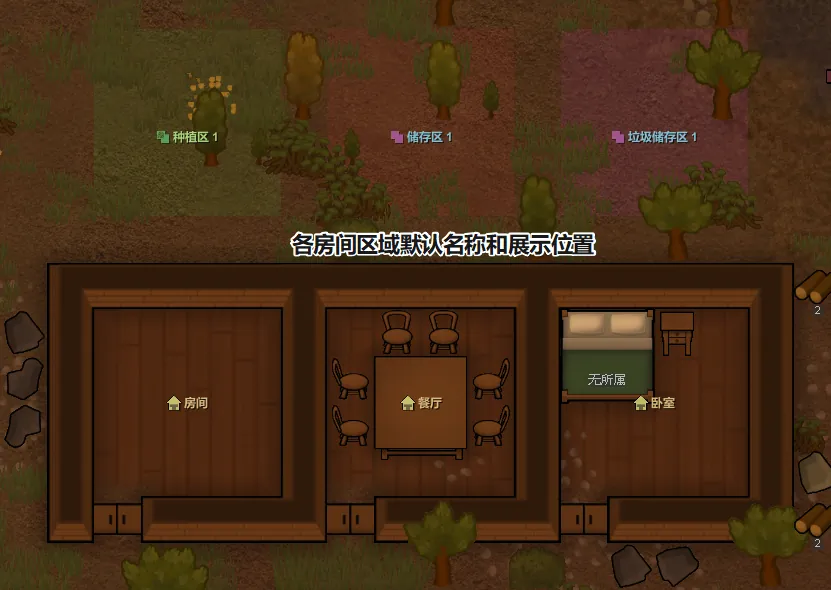
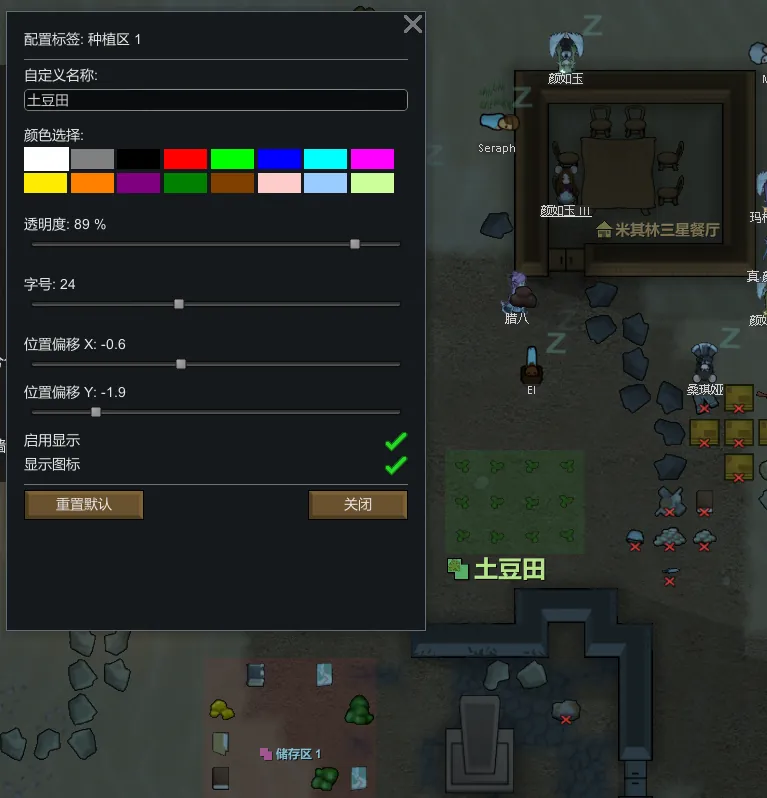
麦丫标签机 让你能够直接在游戏地图上,为每一个房间、种植区和储存区添加可视化的自定义标签。
主要功能
- 可视化标签:直接在地图表面显示房间和区域的名字,字体清晰,位置自适应。
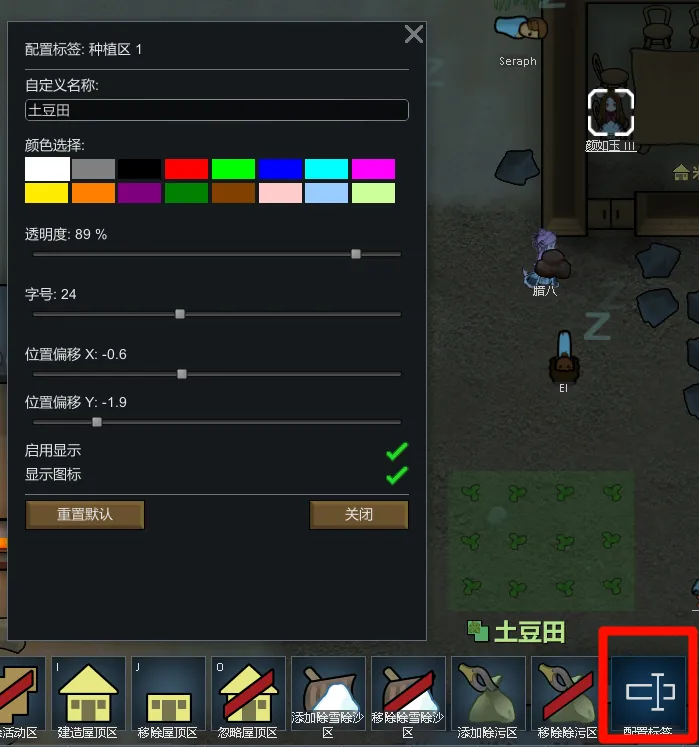
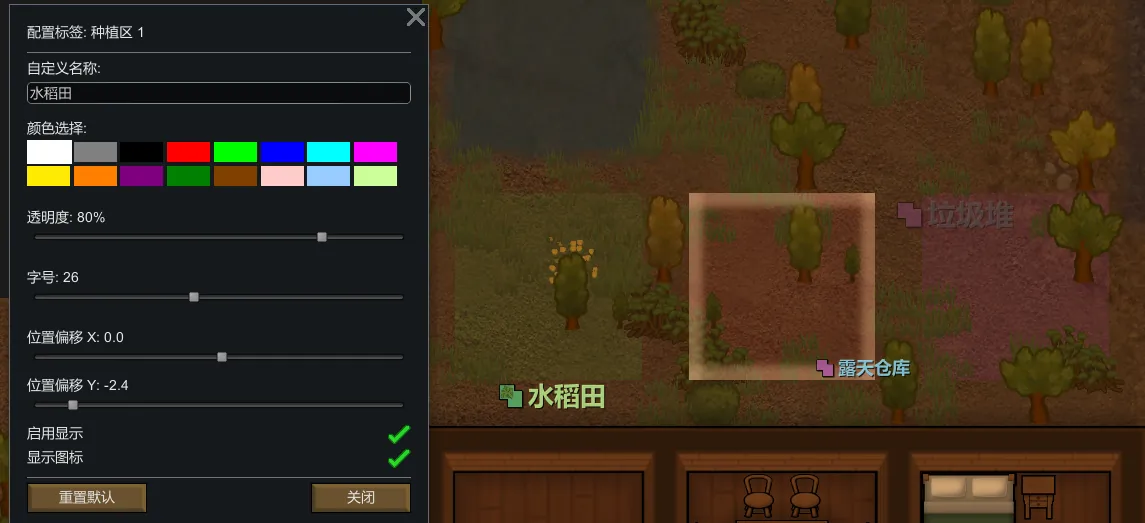
- 高度自定义:
- 改名:把“餐厅”改成“米其林三星”,把“医疗室”改成“协和医院”。
- 改色:内置16种常用色,直接选择。
- 改样式:调整透明度、字号大小、位置偏移。
- 新增添加备注功能(类似描述):房间、区域添加备注后,可以让RimTalk读取到。(例如“这是一间充满了科技感的餐厅,墙上挂着量子相框,空气中弥漫着草莓味营养膏的香气”,RimTalk 的 AI 就能根据这些细节生成无比生动的对话。)
- 图标系统:为不同类型的区域显示原版图标,支持一键开关。
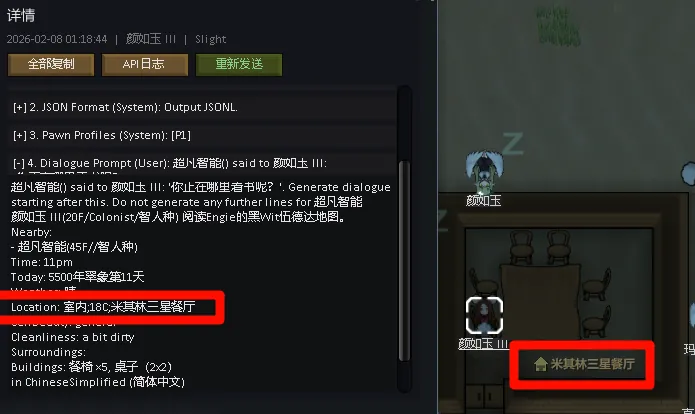
- RimTalk联动:
- 如果你安装了 RimTalk 模组,当你把餐厅改名为“米其林三星”后,小人们在聊天时会真的说出这个名字!
- (例如:“我们要不要去米其林三星餐厅搓一顿?”)
- 安全稳定:
- 针对大型整合包优化,包含“3秒安全启动锁”,杜绝进地图崩溃。
- 对性能几乎无影响。
- 可以随时中途加入或删除。
- mod设置新增奥德赛/SOS2飞船跨地图后维持房间名的功能开关,默认关闭。关闭后,挪动家具到其他房间不再会有命名污染影响了,可以随开随关。
如何使用
1. 开关显示:点击右下角的一排按钮中的“麦丫标签机(重命名图标)”,或者快捷键,或者右键点击底部标签机按钮。
2. 配置标签:在【区域】菜单中选择“配置标签”工具,或者快捷键,或者左键点击底部标签机按钮,然后点击任意房间或区域使用。
兼容性
- 支持 RimWorld 1.5、1.6 版本。
- 完美兼容 RimTalk(软兼容,不强制安装)。
- 界面缩放已处理。
语言
- 支持中文、英文。
- 考虑日韩俄三语。
爱发电 随缘随缘~ https://afdian.com/a/maiya0126
Description
Are you tired of seeing generic "Bedroom" or "Storage" labels everywhere?
Maiya Labeler allows you to add visual, customizable labels to every room, growing zone, and stockpile directly on the map.
Features
- Visual Labels: Display names directly on the map surface with clear fonts and adaptive positioning.
- Full Customization:
- Rename: Change "Dining Room" to "Michelin 3-Star Restaurant".
- Recolor: 16 preset colors + full RGB slider support.
- Style: Adjust opacity, font size, and position offset.
- Icon System: Cute icons for different zone types (Room, Farm, Storage). Can be toggled on/off.
- RimTalk Integration:
- If you use the RimTalk mod, pawns will recognize your custom room names in their conversations!
- (e.g., "Let's grab a drink at the Michelin 3-Star Restaurant.")
- Safe and Performance Friendly:
- Includes a "3-second safety lock" on map load to prevent crashes in large modpacks.
- Zero performance impact.
- Safe to add or remove mid-save.
How to Use
1. Toggle Display: Click the "Rename" icon in the bottom-right controls.
2. Configure Labels: Select the "Configure Label" tool in the Zone tab and click on any room.
Compatibility
- Supports RimWorld 1.5/1.6.
- Fully compatible with RimTalk (Soft dependency, works fine without it).
Languages
- Supports Chinese and English.
- Consider Japanese, Korean, and Russian.
If you enjoy what I do, consider supporting me on Ko-fi! Every little bit means the world! https://ko-fi.com/maiya0126
✨ 我的其他模组推荐
扣扣群 1568455
感谢支持,欢迎体验我的其他作品!👇
📦 RimTalk DynamicColors 边缘世谭-言出多彩
让你的RimTalk对话更加多彩。
🔗 Steam Workshop
📦 RimTuber 环主播
RimTuber 环主播让你的殖民地变成一个真正的直播间!
🔗 Steam Workshop
📦 Rim Digital Life:Core 边缘数码生活:核心版
内含众多有趣装备和建筑,与多个模组进行联动,增加数码生活体验。
🔗 Steam Workshop
📦 Rim AiVinci 边缘智绘
为你的殖民者绘制专属立绘,不用重启游戏就可导入并更换立绘。
🔗 Steam Workshop
📦 Maiya Labeler 麦丫标签机
可以为你地图的房间、种植区、储存区加上自定义名称,并可调整文字大小与位置。
🔗 Steam Workshop
📦 Project T.I.T.A.N. (Thrumbo Expansion)
为敲击兽引入了独一无二的原型体宠物、史诗级的三神兽事件以及动态的阵营互动,以及升级体系。
🔗 Steam Workshop
📦 Golden Books 书中自有黄金屋
书中自有黄金屋,书中有女颜如玉。让书本成为你的财富,甚至为你带来新的极品殖民者。
🔗 Steam Workshop
📦 Metamorphosis 变形记
通过药物将小人变成对应种族的动物,并可以还原回来。设置里高度自定义。
🔗 Steam Workshop