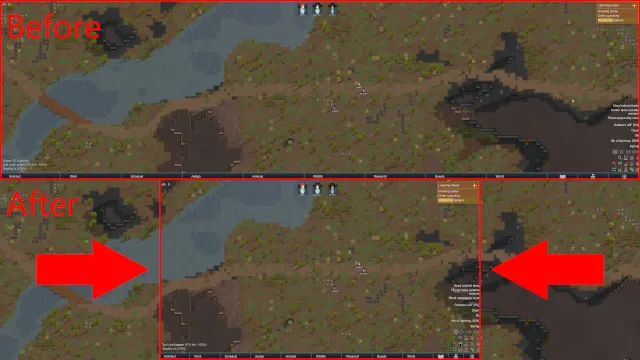
Are you using a wide display and find the UI on the edges to be too far away? Use this mod to move it closer to the middle!
Adjust UI position in the mod settings.
I modified all the UI elements on the edge of the screen during typical gameplay. I didn't touch anything in the main menu nor dev mode.
Mod compatibility and issues
So far I've added support for:
- RimHUD
- FoodAlert (Continued)
- Vanilla Achievements Expanded
- Vanilla Factions Expanded - Empire
- Vanilla Psycasts Expanded
- Health Display
- Work Tab
- Better Architect Menu
If you find any bugs or compatibility issues, let me know.
Triple monitors
If you're using three monitors, turn the UI width down to 33% to have all your UI on the center screen while still playing Rimworld on all three screens.
NVIDIA
Here's a short guide courtesy of Gula:
This mod does not simply enable larger render resolution. Instead you'll have to configure Surround in order to get multi-monitor display to work.
Right click your desktop and go to NVIDIA Control Panel. Under 3D Settings, select "Configure Surround, PhysX". Now enable "Surround Configuration" checkbox that says "Span Displays with Surround" and be sure to configure your monitors to the proper sort order (once you configure, wait a few moments for the displays to start rendering). Congratulations now you are in surround.
Which means that you can launch the game (or any game really) and enable the resolution you see, in my case I now have the option to go in to Rimworld options > Graphics > Resolution dropdown now has setting "7680x1440" available.
AMD
Courtesy of me, if anyone knows another way let me know.
- Open AMD Software: Adrenaline Edition
- Click Gaming
- Click Display
- Scroll down to AMD Eyefinity
- Click Quick Setup
Source[github.com]