Chorded Keybinds
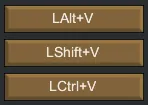
Chorded Keybinds adds support for key chords (e.g., Ctrl+Z, Shift+Alt+Q) in the Keyboard Configuration menu and makes them work in-game. Hold your modifiers, press a key to bind, and the UI will show labels like Ctrl+Z or LCtrl+Z.
Features
- Chorded bindings in the UI: set Ctrl/Shift/Alt/Command + key directly in Keyboard Configuration.
- Left/right modifiers: bind LCtrl vs RCtrl (or use "any" modifier) with clear labels.
- Chord-aware conflicts: the same base key can coexist with different modifier combos.
- A/B slot support: chords are saved per binding slot.
- Modifier-only bindings: press and release a modifier to bind it alone.
- In-game evaluation: JustPressed/IsDown checks respect your chords.
- Search-safe: keybinds won’t fire while typing in search boxes. (Search widgets are ignored.)
Settings
No settings. Configure bindings in Options > Keyboard Configuration.
Performance
Lightweight; no background ticking. Only extends keybinding UI and input evaluation.
Requirements
- Harmony
Supported Languages
All
Supported Versions
1.4, 1.5, 1.6