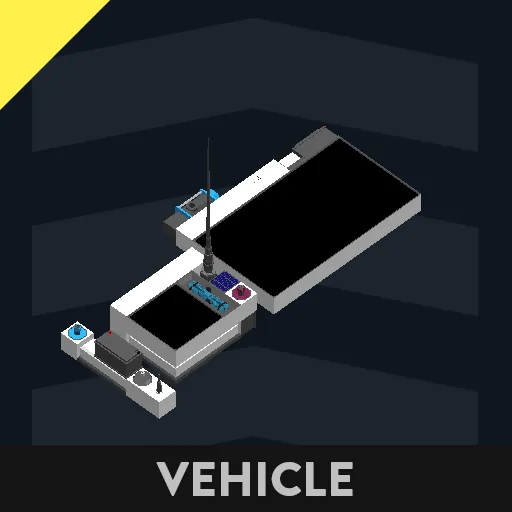
Time Measurement System
Attach the smallest Merge to the vehicle whose time you wish to measure.
The Merge with a 9x5 display is optional; attaching it is up to you.
If you have multiple Merges with keys and buttons, place at least one within communication range of the “time-measuring vehicle” in the world when measuring time.
Description of Each Component
Regarding the Smallest Merge
This is the component that measures time.
The microcontroller's video node is optional; it will function without it, but in that case, place the microcontroller where the player can see it.
The antenna and physical sensor are required, but their orientation is free. Do not forget to connect the power supply.
Match the antenna frequency to the transmitter
explained later.
For Merges with Multiple Keys and Buttons
This is the data transmission section.
When spawned, first turn the Power button on if it's off.
Then press [K] on the display; this should be the most readable setting initially.
If it becomes hard to see, press [K] again, or try [X] or [-].
Enter coordinates on the 2x1x1 keyboard.
Enter the coordinate range on the Rang keyboard.
Enter the priority for that coordinate on the ID keyboard. Use values 0 or higher; smaller values indicate higher priority.
Pressing the Add button adds the coordinates.
However, entering 0,0 on the keyboard will delete the coordinates for that ID.
If coordinates with the same ID exist, they will be overwritten.
Setting the ID to a value less than 0 will delete all existing coordinates.
When the Send Start button is pressed, two or more coordinates are entered, and the coordinates are received by the receiver, the receiver's settings lock, and it prepares to start measuring time.
Press and hold the Send Start button for 3 seconds to reset.
When Start Mode is off, measurement begins when the vehicle moves outside the area defined by the smallest ID coordinate.
When Start Mode is on, measurement begins if the speed is equal to or greater than the speed (km/h) set on the keyboard above and the vehicle is within the area defined by the smallest ID coordinate.
Display operations: [+],[-] zoom in/out, [X] reset position, [K] display current keyboard coordinates, arrow keys move around. If coordinates exist, touching the range will delete them.
The power anchor handles data transmission and reception.
If another transmitter has data you wish to transfer, delete all data on the target transmitter first, then connect via cable.
The data should copy over.
About Options
When measuring time, you can view more detailed measurement information.
It draws the transmitted data on a map, plots your position, shows your direction of travel, displays the direction to the next destination during measurement, and after measurement, shows the time (ticks) from the closest current coordinate to the target coordinate, along with maximum speed, minimum speed, average speed, maximum altitude, minimum altitude, and average altitude.
Probably that's all.
I know my explanations aren't great.
Hope this gets the point across...
Probably a lot of unnecessary features...
Typing each key is probably a pain...
Please forgive me for prioritizing versatility...
Also, there might be bugs, so please let me know if you find any.
And feel free to modify it however you like.
---------------
時間計測システム
一番小さいマージは時間を計測したいビークルにつけてください。
9x5ディスプレイがあるマージはオプションなのでつけるかどうかは自由です。
キーとボタンが複数あるマージは時間を計測する時にワールド内の「時間を計測するビークル」と通信できる範囲内に一つ以上置いてください。
それぞれの説明
一番小さいマージについて
これは時間を測定する部分です。
マイコンのビデオノードはオプションなので、外しても動作しますが、その場合はプレイヤーがマイコンを見ることができる位置にマイコンを設置してください。
アンテナと物理センサーは必須ですが、向きは自由です。電力も繋ぎ忘れないでください。
アンテナの周波数はこのあと説明する送信機
と合わせてください。
キーとボタンが複数あるマージについて
これはデータを送信する部分です。
スポーンさせた時、まずボタンのPowerがオフならオンにしてください。
次にディスプレイの[K]を押すと一番最初は見やすいと思います。
見辛くなったら[K]をもう一度押したり、[X]や[-]を押してみてください。
2x1x1のキーボードに座標を入力してください。
Rangのキーボードには、座標の範囲を入力してください。
IDのキーボードには、その座標の優先順位を入力してください。0以上で、小さい値が優先度が高いです。
Addボタンを押すと、座標が追加されますが、
キーボードに0,0を入力した場合は、そのIDの座標を削除することになります。
もし同じIDの座標があれば、上書きされます。
IDを0未満にした場合、今あるすべての座標を削除することになります。
Send Startボタンが押されたかつ、座標が二つ以上入力されているかつ、受信機に座標が受信されている場合、受信機で設定が固定され、時間の測定を開始する準備が整います。
Send Startボタンを3秒長押しすることで、リセットできます。
Start Modeがオフの時は、最もIDが小さい座標の外に出たところから計測を開始します。
オンの時は、上のキーボードのspeed(km/h)の速度以上かつ、最もIDが小さい座標の範囲内なら計測を開始します。
ディスプレイの操作は、[+],[-]で拡大縮小、[X]でポジションをリセット、[K]で今のキーボードの座標を表示、上下左右の矢印で移動、もし座標があるならその範囲をタッチすると削除できます。
電力アンカーは、データの送受信を行います。
もう一つの送信機にデータがあって、そのデータを移したい場合、移す相手のデータを全て削除してからケーブルで繋げてください。
データがコピーされると思います。
オプションについて
時間を計測する時、より詳細に計測情報を見ることができます。
送られたデータをマップに描画し、自分の位置を描画し、自分の進んでいる向きを描画し、計測中は次の目的地の方向を表示し、計測後は現状最も近い座標から座標までの時間(tick)と最高速度、最低速度、平均速度、最大高度、最低高度、平均高度を確認できます。
多分以上。
結構説明が下手なのがわかると思う。
なんとか伝わってくれ…
いらない機能も多いだろう…
いちいちキーを入力するのも面倒だろう…
汎用性を高めたってことで許してほしい...
そして、バグがあるかもしれないので、もしあったら教えてください。
あと、自由に改造して構いません。