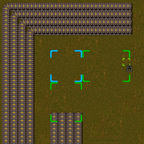
- Ctrl+R over a entity (pipe, wall or belt), where you want to start, now you're in building mode.
- Select the end of the line, will show a area selected, where your line will be builded. If this area have red corners, can't avoid the obstacles, in other case, don't exists obstacles or can be avoided (Underground)
- With + and - can adjust the width of the line
- When you selected the area and size where you want to build, use Crtl+R again.
If you want to cancel the line, only ignore it, with Q or select other item