Reload Vehicle by saveFile
Overview
This is a Lua script addon that allows you to respawn your current vehicle from a save file right where you are.
It is designed for situations where you have updated vehicle save data using an external editor, allowing you to reload while remaining seated without returning to the workbench.
[hr]
Usage
While seated in a vehicle, enter the following commands in the chat:
[b]?rv[/b]
Reloads the currently occupied vehicle.
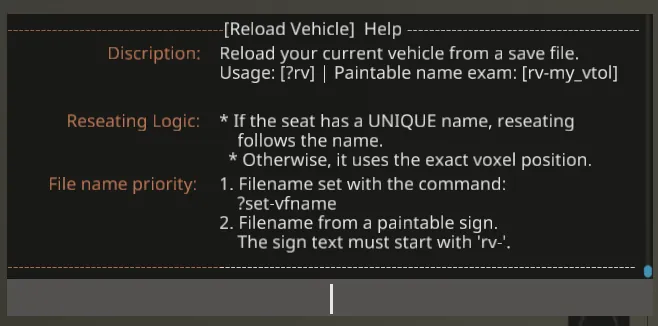
[b]?rv help[/b]
Displays help in-game.
[b]?set-vfname [filename][/b]
Manually sets a fixed save file name to load.
(Example:
?set-vfname my_boat_v1
)To clear this setting, execute
?set-vfname
without arguments.
[hr]
Detailed Specifications & Behavior
This script operates based on the following logic:
1. Filename Priority
The vehicle data loaded during a reload is determined in the following order:
[list]
[*] [b]Priority 1 (High): Command Setting[/b]
If a filename is specified via the
?set-vfname
command, it is used with the highest priority.
[*] [b]Priority 2 (Low): Paintable Sign[/b]
Checks the name of a Paintable Sign placed on the vehicle.
Set the sign's Component Name to start with [b]rv-[/b].
(Example: If the sign name is
rv-my_helicopter
, it will look for and load the file
my_helicopter
)
[/list]
* If no filename is found, the reload will not execute.
2. Reseating Logic
The process for returning the player to their original seat after a reload is determined by the following logic:
[list]
[*] [b]Unique Name Check[/b]
If the seat's name (Component Name) is [b]UNIQUE[/b] within the vehicle, you will be seated in the seat with that name after the reload.
This ensures correct seating even if the vehicle shape changes or the seat moves, provided the name remains the same.
[*] [b]Position Check[/b]
If the seat has no name, or if there are multiple seats with the same name, you will be seated in the seat that matches the exact "voxel position" from before the reload.
[/list]
[hr]
Installation
1. Subscribe to this addon.
2. Start the game, and select "Addons" when creating a new game or editing an existing save.
3. Select this addon from the Workshop tab and enable it.
Notes
[list]
[*] Performing a reload despawns (deletes) the original vehicle and spawns the new vehicle in the same location.
[*] Intended for vehicle development and debugging purposes.
[/list]