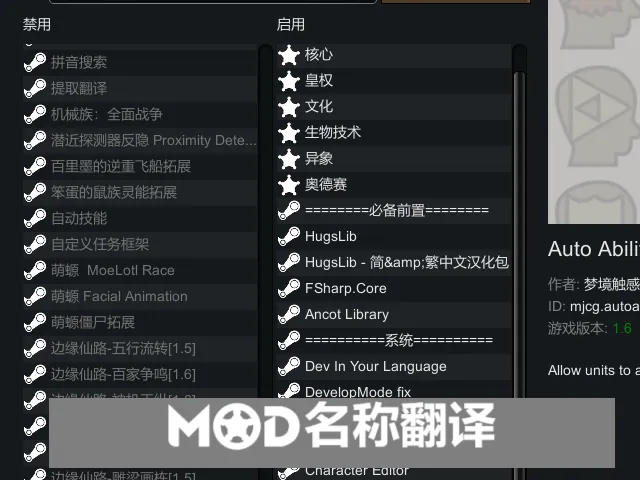
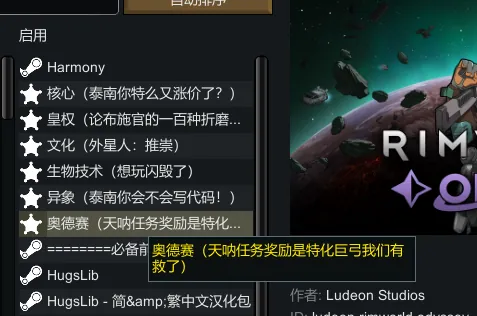
Replaces the mod name in your mod list with the Chinese name from the Workshop page, and the search function will search for the corresponding Chinese name.
Principle
Sends an HTTPS request to the item's Workshop page and analyzes its page title to obtain the title name in your language (default to Chinese, or if you modify it to your language).
Will not automatically translate mods!
Automatic Translation Feature
You need to first open Options - Mod Options, find "Mod Name Translation," and then select the proxy above (can be left blank) and the language (default is zh-CN, zh, which is the browser language set in the HTTPS protocol, so Steam will return the Chinese name. You can change it to your language, and if you don't know what to fill in, ask AI). After clicking the get button, if you have Developer Mode enabled, a log will pop up as shown in the image below (it is recommended to at least temporarily enable it to determine if the retrieval is complete): 
Custom Note Feature
: After retrieving the translation using the method above, you can also custom-edit the corresponding name, or simply delete it. When searching the mod list, both the original name and the translated name will be searched.
One-Click Add Option
: If you want to customize names for mods that do not have a translation, you need to click generate all name pairs. This will create a corresponding editable entry for all your mods (it will only add entries for mods that are not already listed below, so you don't have to worry about already generated mod names being deleted), and then you can custom-edit the name for any mod. However, the drawback of this method is that you will no longer be able to retrieve translations via the get button (because the get button only adds translations for mods not yet in the list).
Note: Clicking the get button will only attempt to retrieve names for mods that have not been set.
Note 2: If you want to stop the retrieval process (e.g., if the network is too slow), press the Esc key and navigate to the Mod configuration page on the game's home screen; the retrieval process will be terminated.
Note 3: Some mod names may result in incorrect names. This is because they are blocked; for example, some mod might have an "Adult Content" warning, making it impossible to retrieve the correct name.